

Document an automation workflow so the next person can answer four questions: what should happen, where did this run stop, what has already changed, and what can be retried safely? Put those answers beside the workflow’s owner, live configuration, and execution history.
A diagram helps explain the route. A repairable handoff also needs field mappings, decision rules, evidence of success, and instructions for partial failures. The most useful document lets a colleague investigate without depending on the builder’s memory.
1. Start with a workflow identity card
Create one authoritative page for each business outcome. Give it a descriptive name, such as “Approved intake request to service ticket,” and link it from the automation’s description. Put the live workflow link on the page so readers can move in both directions.
Use the opening block to establish scope:
- Purpose: the business result and the point at which the automation’s responsibility ends.
- Owner and backup: who maintains the workflow, plus who can authorize a production repair.
- Location: platform, workspace, environment, workflow ID, and configuration version.
- Trigger: event or schedule, time zone, eligibility rules, and expected timing.
- Success: the destination record or other observable result that proves completion.
- Support: links to run history, alerts, the access-request process, and relevant vendor documentation.
Separate an accountable owner from an account used by the integration. “Runs under the operations connection” does not tell a colleague whom to contact when that connection stops working.
AWS’s runbook guidance calls for a clear outcome, required tools and permissions, error handling, ownership, and validation by another team member. Apply that baseline to the business task you are documenting, even if you use a no-code platform.
2. Map the route, including the paths that stop
Walk through the actual configuration. Record each trigger, transformation, lookup, decision, write, and notification in execution order. Use the same step names as the builder interface or code. A log entry labeled “Create service ticket” should lead to a matching heading or row in the document.
Show rejection, waiting, and exception paths. If a required field is missing, does the run stop, wait for a person, or continue with a default? If an approval expires, who receives the unresolved item? A line labeled “approval” is incomplete until those outcomes are recorded.
The following is a fictional service-intake workflow, provided as a documentation example rather than a tested implementation:
| Step | Decision or action | Evidence to retain |
|---|---|---|
| Receive request | Accept a new submission with a stable request ID. | Source request ID and receipt time. |
| Validate fields | Require a service type and account ID; send missing values to review. | Validation outcome and missing field names. |
| Check prior processing | Look for a destination ticket associated with the request ID. | Matched ticket ID or recorded lookup result. |
| Create or reuse ticket | Reuse a confirmed existing ticket; otherwise follow the configured creation and duplicate-prevention rules. | Destination ticket ID and action result. |
| Record completion | Write the ticket reference back to the source record. | Source record now contains the destination ID. |
| Notify operations | Send the ticket reference to the configured team destination. | Notification outcome, recorded separately from ticket creation. |
Mark every point where the automation changes another system. These are the points a responder must inspect before repeating a run. A successful ticket creation followed by a failed notification is a different recovery problem from a failed ticket creation.
For workflows involving invoice review, document the routing conditions and approval evidence described in this guide to invoice approval software features for small teams. Keep your own configured rules alongside the workflow; a general feature description cannot tell a responder which branch your business uses.
3. Record data contracts and dependencies
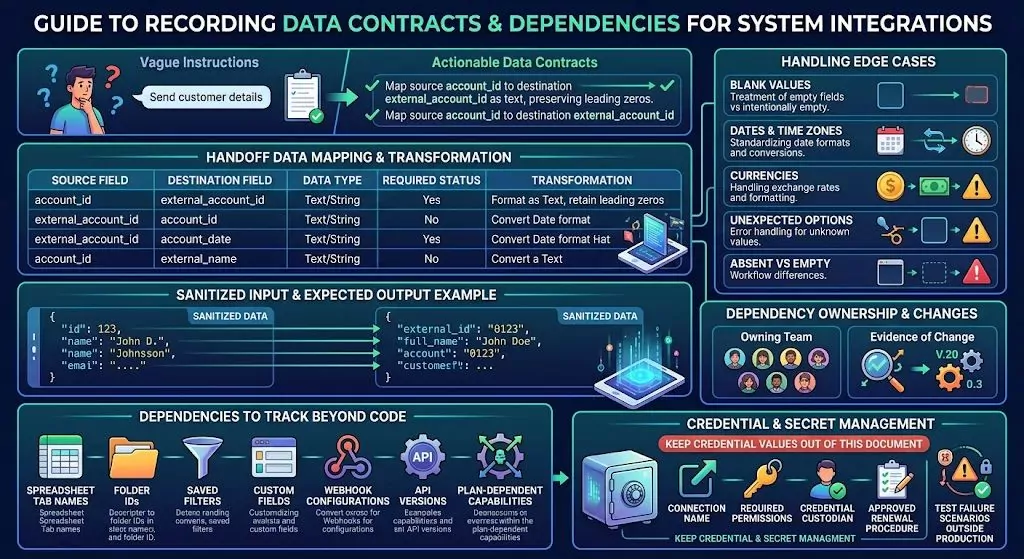
For each handoff between systems, write down the source field, destination field, data type, required status, and transformation. “Send the customer details” leaves too much room for interpretation. “Map source account_id to destination external_account_id as text, preserving leading zeros” is actionable.
Include one sanitized input and its expected output. Explain the treatment of blank values, dates, time zones, currencies where relevant, and unexpected option values. Distinguish an absent field from an intentionally empty one when the workflow treats them differently.
Add dependencies that a builder might otherwise overlook: a spreadsheet tab name, folder ID, saved filter, custom field, webhook configuration, API version, or plan-dependent capability. Record which team owns each dependency and what evidence would reveal that it changed.
Keep credential values out of this document. Record the connection name, required permissions, credential custodian, and approved renewal procedure. New Relic’s workflow guidance similarly separates secrets from workflow definitions and recommends testing failure scenarios outside production.
4. Write the recovery procedure before handing it over
Give the responder a starting point: open the named execution-history view, locate the affected run, and capture its run ID, source record ID, timestamp with time zone, configuration version, and last confirmed successful step. Specify which log fields are safe to share and which require redaction.
Then describe how to establish the destination state. A timeout does not prove that a write failed. The Amazon Builders’ Library explanation of idempotent APIs describes how retries can produce unwanted additional effects and how request identifiers can support safe repetition. Idempotent means repeating the same operation does not create an additional effect under the service’s defined contract.
For each write step, document whether that protection exists, how the identifier is created and reused, and any provider limits. If protection is unknown, require reconciliation before replay. A “find, then create” sequence alone can still race when two runs overlap; record the actual uniqueness or concurrency control your system provides.
This matters especially when a workflow can move money. TMD’s guide to invoice automation mistakes that lead to duplicate payments provides related background on duplicate-processing risks. Your recovery instructions should explicitly identify any action that must not be repeated without checking its outcome.
Use a symptom-to-action repair table
Adapt this example to your actual platform. Replace generic checks with the exact screen, query, or vendor procedure a responder should use.
| Observed symptom | Check first | Documented next action |
|---|---|---|
| No run appears | Whether the source event exists and the trigger is enabled. | Resolve trigger eligibility or delivery before attempting a replay. |
| Validation fails | The rejected field and the expected data contract. | Correct the source through its approved process; preserve the original run reference. |
| Authorization fails | The affected connection and required permission. | Have the connection custodian restore approved access; do not broaden permissions as a shortcut. |
| A write times out | Whether the destination already contains the intended record. | Reconcile the result, then follow the supported resume or retry procedure. |
| Only notification fails | Whether the business record and completion marker already exist. | Retry only the notification if the platform supports that scope; otherwise escalate. |
Record retry limits and delays as configured values, not suggestions to click repeatedly. State what stops automatic retries and who receives the exhausted run. If a manual process takes over, record those manual actions so restarting the automation does not process the same work again.
Separate pausing, resuming, and reversing
Document the scope of the pause control: does it prevent new triggers, affect queued work, or cancel active executions? Confirm this from your platform’s behavior and documentation. Do not assume that turning off a workflow stops work already in progress.
List the supported restart point and the evidence required before resuming. Keep reversal instructions separate. Restoring an earlier workflow configuration does not itself undo records already created or messages already sent. Any compensating action needs its own authorization, verification, and audit record.
5. Add a compact handoff template
Copy this structure into your team’s existing documentation system. Fill every recovery field with a specific instruction or an explicit escalation; a blank field can look like an overlooked task.
Workflow name / ID:
Business outcome and scope:
Owner / backup / repair authority:
Production workflow link:
Configuration version / last validated date:
Trigger / schedule / time zone:
Required access and connection custodian:
Dependencies and field mappings:
Branches, exclusions, and approval rules:
Success evidence and destination record:
Run-history location and correlation IDs:
Known failures and diagnostic checks:
Pause procedure and effect on in-flight work:
Retry eligibility, limits, and duplicate protection:
Resume point and destination-state checks:
Reversal or compensating action:
Manual fallback and reconciliation record:
Escalation contact and stop conditions:
Test cases / results / validator:
Change history:
Keep screenshots as supporting references when they clarify an interface. Pair each with the relevant step name and capture date. The procedure should remain understandable when a button moves or a screenshot becomes stale.
6. Validate the handoff with someone who did not build it
Ask the backup owner to work through the instructions in a controlled test environment using non-sensitive sample records. Include a normal completion, an invalid input, a repeated event, and a partial failure after a destination write. These are proposed test cases; adjust them to the workflow’s real risks and platform capabilities.
Observe where the colleague has to ask for clarification. Add the missing navigation, expected result, or decision rule to the document. Record actual test outcomes, configuration version, validator, and date; do not mark an unexecuted test as passed.
Make documentation updates part of workflow changes. A renamed field, new approver, changed connection, or different retry policy should trigger a review of the relevant instructions. Retain version history so a responder can match an older failed run to the configuration that produced it.
Before handing over ownership, have the backup locate one run, identify its last confirmed business effect, and explain the permitted next action. If they can do that from the document, you have a usable basis for recovery.