
Small businesses don’t need to email customers every day to make email marketing useful. For many, one worthwhile newsletter a month is a practical place to start. A weekly email can work when the business has enough relevant news, advice, products, or offers. More frequent campaigns are better reserved for subscribers who have demonstrated an interest in hearing from the brand.
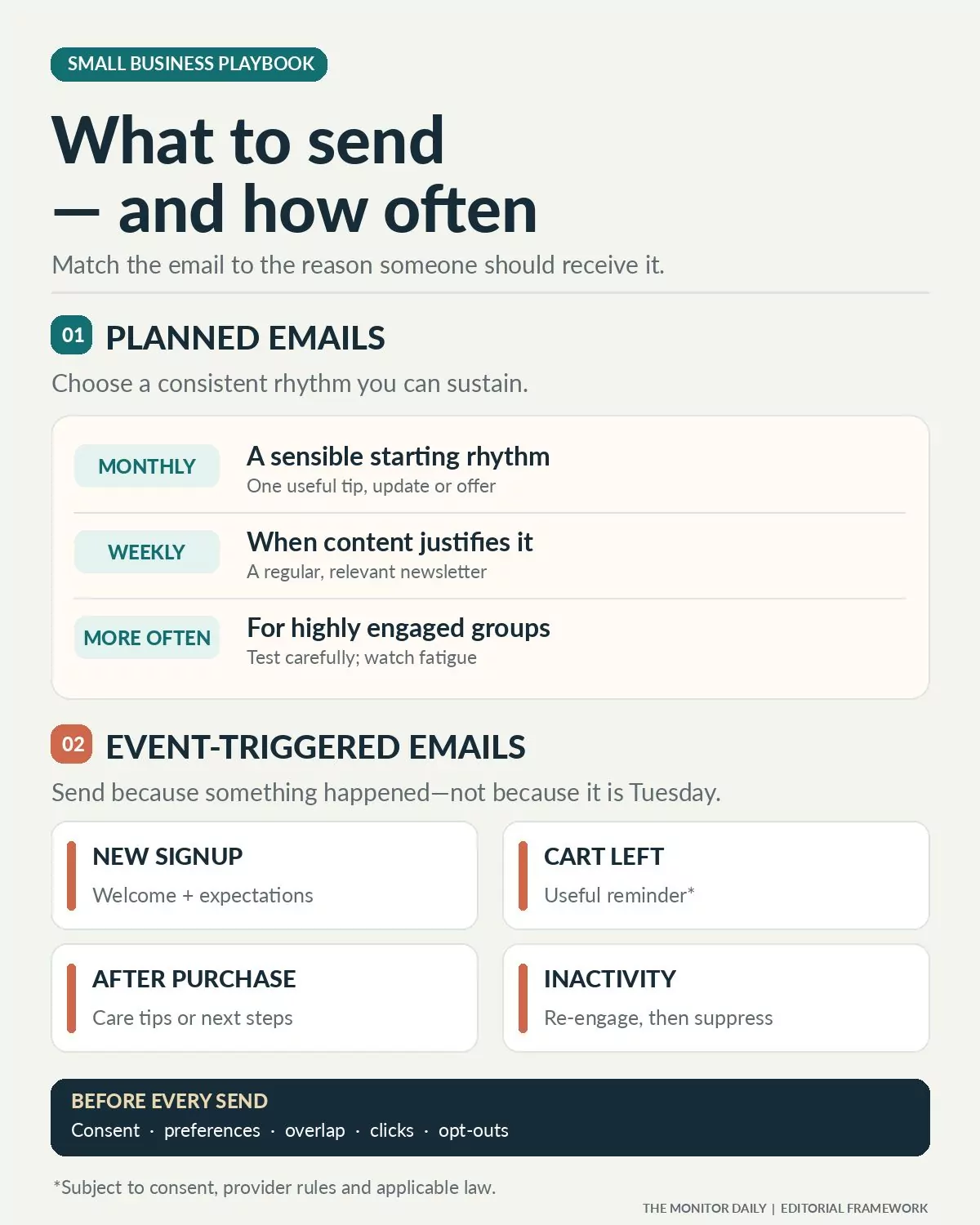
That schedule only covers regular marketing emails. A welcome message should arrive when someone subscribes. A post-purchase follow-up should relate to the purchase. An abandoned-cart reminder, where permitted, should respond to the unfinished checkout rather than wait for the next newsletter.
These are different kinds of communication, and treating them as one calendar is a common planning mistake.
A useful email program has two parts: scheduled campaigns that maintain the relationship and automated messages that respond to customer actions. When those parts work together, a small business can communicate regularly without sending something merely to fill a slot.
How Often Should a Small Business Send Marketing Emails?
There is no universal sending frequency that works for every business.
Mailchimp’s email marketing guidance recommends considering the audience, available content, and customer expectations rather than applying a fixed industry rule. It suggests that monthly communication can be a useful way to maintain contact, while acknowledging that different business models call for different schedules.
A local landscaping company may have enough seasonal advice for one useful monthly message. A clothing retailer receiving new products every week may have a stronger reason to send weekly. A business consultant might communicate less frequently but send more detailed insights to a smaller professional audience.
The following schedule is a starting framework, not a performance benchmark.
| Sending frequency | When it may make sense | What to send |
|---|---|---|
| Once a month | Businesses building their first consistent program | Useful advice, company updates, seasonal reminders |
| Every two weeks | Businesses with regular customer news or services | Alternating educational content and relevant offers |
| Once a week | Retailers, publishers, or businesses with frequent relevant updates | New products, practical tips, events, curated updates |
| Several times a week | Highly engaged subscribers who expect frequent communication | Timely offers, product updates, specialized content |
| Daily | Audiences that explicitly expect daily information | Time-sensitive updates, daily briefings, specialized deals |
A monthly email is not automatically too infrequent, just as a daily email is not automatically excessive. The difference is whether the subscriber expected and values that communication.
If the business cannot consistently prepare a worthwhile weekly email, sending monthly is better than promising weekly updates and delivering repetitive promotions.
Start with the frequency you can maintain
Choose a realistic schedule for the next three months rather than committing to an ambitious campaign calendar.
A small team with one person handling customer service, social media, and marketing may find that a monthly newsletter is manageable. A larger retailer with a dedicated marketing employee and frequent product launches may have enough material for a weekly schedule.
Consistency helps customers recognize a business and understand why they joined its mailing list.
That consistency should extend to the signup form. Someone subscribing to a monthly newsletter should not unexpectedly receive multiple promotional emails every week.
What Small Businesses Should Actually Send
The most useful email depends on what the customer needs next.
A person who has just signed up needs an introduction. Someone comparing services may need answers to common questions. A recent buyer may benefit from product-care instructions. A loyal customer might appreciate early access to an upcoming event.
These communications should not all use the same template or sales pitch.
Welcome emails that establish expectations
A welcome email introduces the business and confirms what the subscriber signed up for.
It should explain what the business offers, what kind of emails will follow, and approximately how often the customer can expect them.
A neighborhood bakery might welcome new subscribers with a short introduction, details of its weekly specials, and a link to the current menu.
An accounting firm could introduce its services and explain that subscribers will receive occasional bookkeeping and small-business administration tips.
The first message does not have to include a discount. Its immediate job is to establish a relevant relationship.
When to send: Promptly after signup, using an automated welcome flow where appropriate.
Educational emails that help customers solve problems
Not every email needs a product offer.
A home maintenance company can explain how to identify signs of a plumbing problem. A bookkeeping service can share an invoice-organization checklist. A neighborhood plant store can offer seasonal plant-care advice.
Educational messages are particularly useful when customers need reassurance or information before purchasing a service.
The subject should relate to a problem the business is qualified to help solve. Generic advice that could come from any company is less compelling than information informed by the products, services, and questions the business handles.
When to send: As part of a monthly or weekly newsletter, depending on the availability of genuinely useful material.
Product updates and service announcements
Customers who have shown interest in a business may want to hear about new products, expanded services, changed hours, or upcoming availability.
A clothing shop can introduce a new collection. A local café can announce a seasonal menu. A software consultancy might explain a newly available service and which clients it is intended to help.
The announcement should answer a simple question: What changed, and why should this particular subscriber care?
Avoid presenting ordinary internal company news as if every customer needs to know about it.
When to send: When a meaningful update occurs, with targeting based on relevant customer interests.
Promotional emails with a specific reason to act
Discounts, limited-time offers, and promotional events can be useful components of an email program.
But a business that uses every message to request another purchase gives subscribers fewer reasons to pay attention between promotions.
A useful promotional email explains the offer clearly, identifies who it is relevant to, and provides one obvious next step.
A retailer might promote a seasonal clearance event. A service provider could announce available appointment slots during a slower period.
Any advertised discount or deadline must be genuine. The subject line should not create false urgency or misrepresent the terms.
When to send: For relevant offers, coordinated with the regular campaign calendar so customers are not overwhelmed by overlapping messages.
Post-purchase follow-ups
The customer relationship continues after an order or appointment.
A useful post-purchase email might provide care instructions, explain the next service step, offer setup guidance, or invite the customer to share feedback.
For example, a business selling handmade candles could send safe-use and care information after purchase. A home cleaning company might follow up after a service appointment with maintenance suggestions and a contact option for concerns.
Keep these messages relevant to what the customer actually purchased.
A transactional receipt or order confirmation is not automatically the same thing as a promotional follow-up. The content and primary purpose of the message can change the rules that apply.
When to send: Based on the relevant purchase, delivery, or service milestone.
Abandoned-cart reminders
An abandoned-cart message reminds an online shopper about items left in an unfinished checkout.
Email platforms such as Mailchimp offer automated abandoned-cart workflows that can respond to checkout activity when the store integration and required settings are available.
A helpful reminder can identify the unfinished order and provide a way to return to checkout.
The business should also look for common reasons customers leave, such as unexpected shipping charges or unclear delivery information.
An abandoned-cart email should not be used as an excuse to contact someone without an appropriate lawful basis or contrary to their communication preferences.
When to send: Through a carefully configured event-triggered workflow, with timing tested against customer behavior and applicable rules.
Re-engagement emails for inactive subscribers
Some subscribers stop interacting because their interests change, their circumstances change, or the messages are no longer relevant.
A re-engagement email gives those people an opportunity to confirm that they still want to hear from the business.
It may ask whether they want to receive fewer emails, choose different topics, or remain subscribed.
If the subscriber does not respond, the business should consider suppressing the contact from regular promotional campaigns rather than continuing to send indefinitely.
Klaviyo’s engagement-based sending guidance recommends sending more frequently to engaged contacts while moving persistently inactive profiles into re-engagement or suppression processes.
When to send: When an established inactivity rule is reached, rather than as another routine newsletter.
The Two Schedules Every Email Program Needs
A campaign calendar and an automation schedule serve different purposes.
The campaign calendar controls newsletters, promotions, and general announcements. An automation schedule responds to a defined event, such as a signup, purchase, or lapse in customer activity.
Separating them helps small businesses avoid both long periods of silence and sudden clusters of unnecessary emails.
Consider this illustrative four-week plan for a small retail business.
| Week | Planned campaign | Event-driven communication |
|---|---|---|
| Week 1 | Monthly customer newsletter with a practical tip and relevant update | Welcome emails to new subscribers |
| Week 2 | No general campaign required | Relevant post-purchase follow-ups |
| Week 3 | Optional targeted offer for interested customers | Eligible abandoned-cart reminders |
| Week 4 | Review engagement and prepare the next newsletter | Re-engagement only for qualifying inactive contacts |
This is an example, not a tested campaign or a recommendation that every retailer send the same sequence.
The important point is that automated messages continue when their triggering conditions occur, even during a week without a general newsletter.
A subscriber could, however, qualify for several messages at once. Someone might sign up, make a purchase, and receive a promotional campaign within a short period.
A good system needs rules to prevent unnecessary overlap.
Prevent Automated Emails From Overloading Customers
Automation can increase the number of messages without anyone deliberately planning to send more.
A customer may receive a welcome email, a product recommendation, a purchase follow-up, and a weekly newsletter in quick succession.
Each message may seem reasonable when viewed alone. Together, they may be excessive.
Businesses should examine the combined experience rather than optimize each campaign separately.
An email platform may offer frequency caps, sending exclusions, or rules that delay additional marketing messages.
For example, a customer who receives a purchase-related promotional follow-up today might be excluded from a general product promotion scheduled for tomorrow. Important service and transactional communications should be handled according to their actual purpose rather than indiscriminately suppressed.
The specific rules depend on the business and its email platform.
Klaviyo’s guidance describes engagement-based schedules and its Smart Sending feature, while explaining that Smart Sending does not automatically enforce every segment-specific cadence.
The business must still decide who should receive which message.
Match Email Frequency to Customer Interest
A single schedule for an entire mailing list may be convenient, but it is not always appropriate.
Someone who frequently purchases, clicks product announcements, or selects weekly updates may welcome more communication than a person who subscribed months ago and has shown little activity.
A basic segmentation approach can distinguish:
- New subscribers: People still learning what the business provides.
- Active subscribers: People who recently clicked, purchased, replied, or otherwise demonstrated relevant interest.
- Occasional customers: People who remain subscribed but have less frequent engagement.
- Inactive contacts: People who have not demonstrated meaningful engagement within the business’s selected review period.
The precise criteria should depend on available data and the normal customer purchase cycle.
A furniture store may have long gaps between purchases. A weekly grocery business may have much shorter gaps. Using the same inactivity threshold for both would make little sense.
Subscribers should also be able to express their preferences directly.
A preference center that offers monthly, weekly, or topic-specific options can help a business respect those choices. It must still provide any legally required option to stop all marketing messages.
How to Tell Whether You’re Sending Too Often
A drop in email performance does not always mean the business should send less frequently.
The offer may be irrelevant, the list may contain inactive addresses, or the audience may have changed.
Before reducing the schedule, look at several measures together.
| Metric | What it can indicate | How to interpret it |
|---|---|---|
| Unique click rate | Whether recipients interact with the message | Compare similar campaign types and audiences |
| Unsubscribe rate | Whether recipients are choosing to leave | Watch for changes after increasing frequency |
| Spam complaints | Whether recipients consider messages unwanted | Investigate immediately and review list practices |
| Conversion rate | Whether email traffic completes the intended action | Use a clearly defined action and denominator |
| Email-attributed revenue | Sales credited to email campaigns | Check attribution rules and overlap with other channels |
| Bounce rate | Address quality and delivery problems | Investigate invalid addresses and sending setup |
For consistency, calculate the campaign click rate as unique clicking recipients divided by delivered emails, using the same definition across comparisons.
The analysis becomes less useful when monthly and weekly campaigns target completely different audiences or offer different types of content.
Be careful with open rates
Open rates are widely displayed in email marketing dashboards, but they are not a dependable standalone measure of reader attention.
Apple’s Mail Privacy Protection can preload email images, causing some tracking systems to register opens without a corresponding human read.
Mailchimp’s explanation of Apple Mail Privacy Protection recommends looking more closely at clicks, purchases, unsubscribes, and other meaningful actions.
Opens can still provide limited context, but businesses should avoid increasing email frequency simply because reported open rates appear strong.
Test frequency without changing everything at once
A business currently sending monthly could compare a slightly more frequent schedule for an appropriate, comparable subscriber group.
The test should have a defined period and an agreed measure of success.
For example, the firm could examine whether adding a second genuinely useful message increases total qualified inquiries without causing a concerning increase in unsubscribes or complaints.
Track the total outcome per subscriber as well as the result of each individual email.
Two campaigns producing more aggregate clicks are not necessarily better if they create disproportionately more opt-outs or simply divide the same conversions between two messages.
Avoid introducing major changes in subject matter, discount size, and audience targeting at the same time if the purpose is to learn about frequency.
What a Good Small-Business Marketing Email Looks Like
A useful message does not require an elaborate design.
A clear structure often works well:
Subject: State the reason to read.
Opening: Explain why the information matters to this customer.
Main content: Deliver the promised advice, announcement, or offer.
Next step: Provide one prominent action.
Footer: Include the required business identification and unsubscribe information.
For example, a gardening supply store sending its monthly newsletter might use the subject line “Three things to check before the first frost.”
The email could give brief seasonal advice, link to a more detailed guide, and mention relevant supplies without making every paragraph a product pitch.
A professional services firm might instead use a subject line such as “A simpler way to organize your monthly invoices” and offer a short checklist.
The writing should reflect the customer’s interest and the business’s actual expertise.
A useful test is to read the email without its logo. Would the recipient still learn something useful or see a relevant reason to act?
If not, the message probably needs a clearer purpose.
Keep Your Email Program Compliant
US small businesses sending commercial marketing messages need to understand the CAN-SPAM Act.
According to the Federal Trade Commission’s compliance guide, the law applies to commercial email, including business-to-business messages.
Among its requirements, businesses must use accurate sender information and nondeceptive subject lines, include a valid physical postal address, provide a clear opt-out method, and honor opt-out requests within 10 business days.
The opt-out mechanism must remain capable of processing requests for at least 30 days after the message is sent.
CAN-SPAM does not generally require advance opt-in consent for every US commercial email, but building a permission-based list is a sensible business practice. Other laws and jurisdictions may impose additional consent requirements.
Buying contact lists or adding unrelated addresses without a legitimate expectation of communication can create legal, reputational, and deliverability problems.
Gmail and other mailbox providers have additional sending rules
Legal compliance and inbox-provider requirements are not identical.
Google’s email sender guidelines require senders to meet technical authentication and sending standards. Requirements become stricter for bulk senders, including those sending approximately 5,000 or more messages to personal Gmail accounts within 24 hours.
Bulk-sender requirements include SPF, DKIM, DMARC, and one-click unsubscribe support for marketing and subscribed messages, along with a visible unsubscribe link.
Yahoo also maintains sender requirements, including list-unsubscribe standards for promotional mail.
A small business should check that its email service provider supports the necessary authentication and unsubscribe features instead of assuming its messages are compliant simply because the software allows them to be sent.
Transactional messages and marketing messages can be treated differently under applicable rules. Adding substantial promotional content to an otherwise transactional email can also change how its primary purpose is evaluated.
How to Start With a Small Team and Limited Time
A new email program does not need a complicated automation system from the beginning.
First, collect addresses through appropriate signup methods and explain what subscribers will receive.
Next, create a welcome email and a simple monthly newsletter format. Choose one useful subject for the first newsletter rather than attempting to include every business announcement.
Connect relevant customer events only when the underlying data and workflows are reliable. A retailer may start with post-purchase information or an abandoned-cart workflow; a service provider may find appointment and customer-care communications more relevant.
Keep customer records organized, document communication preferences, and ensure unsubscribe requests update the correct suppression lists.
After a few sends, review clicks, inquiries, unsubscribes, and any relevant sales activity. Decide whether a higher frequency would actually serve customers better.
The system can become more sophisticated as the business gains evidence about what subscribers value.
A Schedule Worth Keeping
For a business beginning with email marketing, a well-prepared monthly newsletter and a prompt welcome message are enough to establish a sensible foundation.
Add automated follow-ups when they answer a genuine customer need. Move to weekly campaigns when the business can consistently deliver something worth receiving. Increase frequency for appropriate engaged segments only after examining customer preferences and results.
The central question is not how many emails a business can send.
It is whether each message has a clear purpose, reaches someone who reasonably wants it, and arrives at a time when it is useful.
That decision should guide the calendar, not the other way around.