
If you spend your week chasing people in chat to approve bills, the best invoice approval software for your small team is a simple tool that sends each bill to the right person and keeps a record. You do not need a big enterprise system. A report on e-invoicing found that moving off paper saves about 59% of the cost of handling invoices.
These are the must-have features, from most to least important for a 3- to 20-person team: rules that send bills by amount, vendor, or team; alerts and reminders; sync with QuickBooks or Xero; duplicate checks; an audit trail; and mobile approvals. If you use purchase orders, add 2- and 3-way matching. Then pick a price plan that fits how many approvers you have. The rest of this guide explains each feature in plain words, shows real starting prices, and gives you a simple table for picking two tools to try.
Which Invoice Approval Features Does a Small Team Really Need?
A small team needs six core features: rules that send bills to the right person, reminders, accounting sync, duplicate checks, an audit trail, and mobile approvals. Matching against purchase orders matters only if you use purchase orders.
The sections below rank each feature and explain it in plain words. Use the list as a scorecard when you look at any tool.
What is invoice approval software?
Invoice approval software is a tool that sends bills from your vendors to the people who need to check and OK them, then records what happened. It handles the review, the checks, and the final sign-off for each bill that comes in.
Invoice approval software replaces a messy setup. Most finance teams still bounce between their accounting system, chat threads, PDFs, and spreadsheets. As one review put it, “Invoice approvals should not feel like detective work.”
What are the must-have features, ranked?
The ranked checklist below puts features in order of how much a 3- to 20-person team needs them. Score any tool against it.
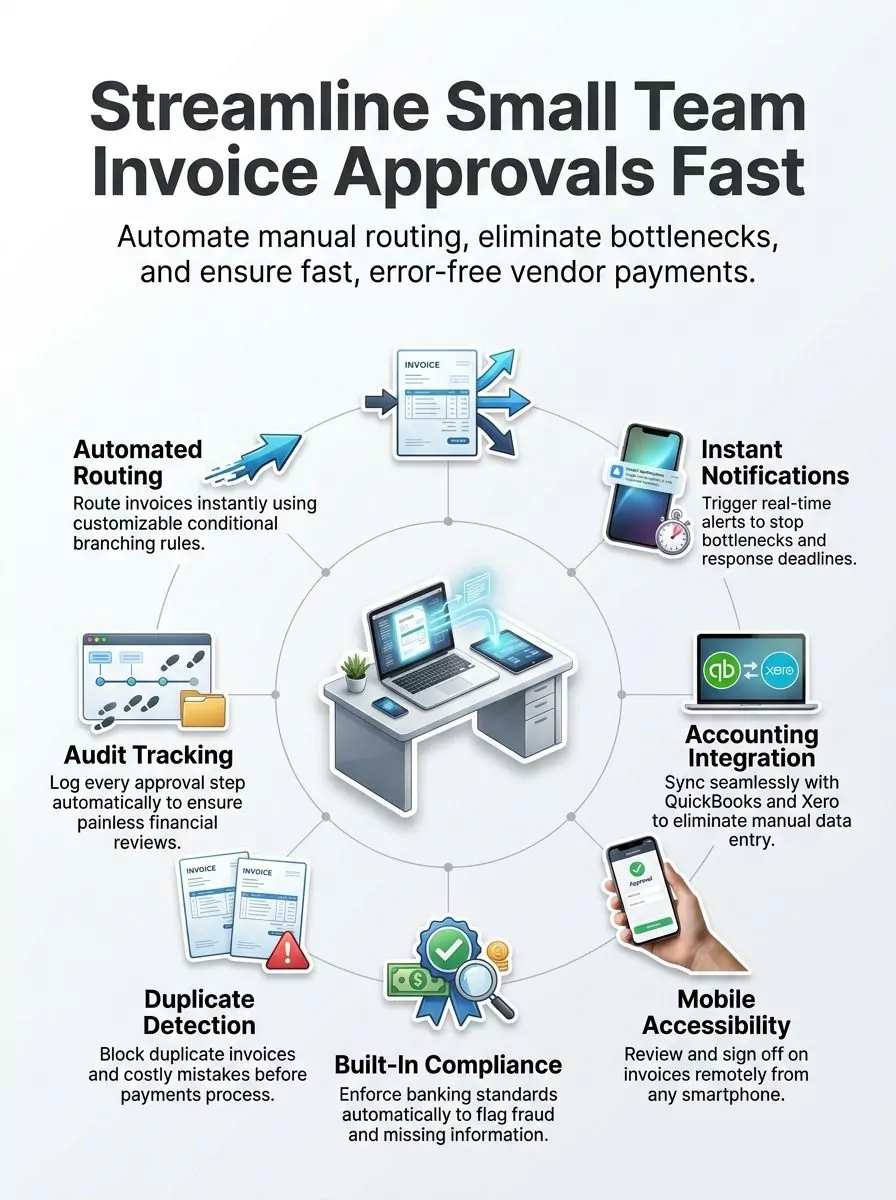
- Rule-based routing. The tool sends each bill to the right person based on vendor, amount, or department. This is the feature that ends the chasing.
- Alerts and reminders. Approvers get a message when a bill lands, and a nudge when it sits too long.
- Sync with QuickBooks or Xero. Approved bills flow into your books, so nobody types them in twice.
- Duplicate checks. The tool flags a bill that looks like one you already paid.
- Audit trail. The tool logs who approved what, and when. You need this at tax time or if something goes wrong.
- Mobile approvals. Approvers can say yes or no from a phone, so bills don’t wait for someone to get back to a desk.
- 2- and 3-way matching. The tool checks each bill against your purchase order and, for 3-way matching, your receipt. This one is a must only if you use purchase orders.
- Pricing that fits a small team. The plan should make sense for your number of approvers, not for a company of hundreds.
Data capture is a nice bonus. This means the tool reads the vendor, date, and amount off a PDF for you. BILL, for example, says its tool pulls invoice fields with 99% accuracy.
How do automated approval workflows work?
Automated approval workflows send each invoice to the right approver the moment it arrives, based on rules you set once. Nobody has to forward emails by hand.
Say any bill from a new vendor goes to the owner, and any bill for the shop goes to the shop manager. You set those rules one time. After that, the tool sorts every bill the same way.
Some tools, like Jotform Workflows, let you build these flows with a drag-and-drop builder and ready-made templates. Jotform Workflows also uses conditional branching. That means “if this, then that” rules, so a bill takes a different path based on what’s on it.
Why do alerts and reminders matter?
Alerts and reminders stop bills from sitting in someone’s inbox until the due date passes. They take the place of you chasing people in chat.
Alerts tell an approver the moment a new bill needs a look. Reminders and time limits nudge them again if they wait too long. Some tools let you set a response deadline for each step.
Alerts also give you a clear view. You can see what stage each bill is in and who needs to act next. That alone can cut most of your “did you approve this yet?” messages.
What accounting tools should invoice software sync with?
Invoice software should sync with the accounting tool you already use. For most small US teams, that means QuickBooks or Xero.
- QuickBooks: Many approval tools sync with QuickBooks, so approved bills land in your books without retyping.
- Xero: Xero pairs with many approval tools to track bills you owe in one place, with less double entry.
- Oracle NetSuite: NetSuite fits growing teams that have moved past QuickBooks or Xero.
Big enterprise suites like SAP Concur, Coupa, Basware, Medius, and Microsoft Power Automate setups are overkill for most small teams. Check the sync before anything else. If a tool doesn’t connect to your books, cross it off.
How do mobile approvals help on-the-go teams?
Mobile approvals let approvers OK a bill from a phone or tablet, so bills keep moving when people are out. For a small team where the owner is often on the road, this feature matters a lot.
Mobile approvals work from a client meeting, a job site, or home. The Jotform Inbox, for example, works on any device. Many other tools have their own phone apps.
What is 2- and 3-way matching?
2- and 3-way matching is an automatic check that a bill matches what you ordered and what you got. It catches errors and cuts manual work.
Here is how it works in plain words:
- 2-way match: The tool compares the bill to your purchase order (PO). A PO is the written order you sent the vendor. If the price or amount doesn’t match, the tool flags it.
- 3-way match: The tool also compares the bill to your receipt. That’s the record that the goods actually showed up.
Matching only helps if you write purchase orders. Many teams of 2 to 10 people don’t. If you don’t, skip this feature for now and add it when you grow.
Why do duplicate checks and audit trails matter?
Duplicate checks stop you from paying the same bill twice. Audit trails show who approved each bill and when.
Duplicate checks matter because vendors often send the same bill by email and by mail, or send it again as a reminder. Stampli is one tool known for catching duplicate invoices before they get paid.
Audit trails protect you during a tax review or a dispute with a vendor. They also help when you ask, “Who said yes to this?” Every step gets logged, so you don’t have to dig through old chats.
Which features are enterprise extras you can skip?
Most small US teams can skip global payment and big-company connector features. These features are built for large firms with many locations.
- Payments to 200+ countries, like Tipalti offers. This is useful only if you pay lots of overseas vendors.
- E-invoicing compliance in 50+ countries, like Coupa offers.
- 100+ connectors for big business systems, like Medius offers.
These features are not bad. You just don’t want to pay for them if you have a handful of US vendors and use QuickBooks or Xero.
Is a shared invoice inbox enough for a very small team?
A shared invoice inbox can be enough for a lean team that just needs bills in one place. It is lighter than full accounts payable (AP) automation. AP means the bills your business owes.
Invoiceless is one example. It is a bill approval tool for small businesses and lean teams. You forward emails or upload files into one inbox to manage them in one place.
A shared inbox works well if you have one or two approvers. If you need rules by amount, matching, or payments, move up to a full AP tool.
How Do Payment and Compliance Rules Affect Your Invoice Approvals?
Payment and compliance rules affect your approvals by asking for clean records: who approved each bill, when, and whether it matched what you ordered. For a small team, your own approval rules matter most.
Payment network rules are set by card networks and banks. They shape how payments move and what data must stay safe. Your approval tool doesn’t replace your bank’s checks, but it gives you the paper trail to back them up.
What can a small team learn from the federal government’s system?
The U.S. Treasury runs a model worth copying. Its Invoice Processing Platform (IPP) is “a secure, web-based, centralized program through which federal agencies better manage the invoicing process for goods and services, from purchase order to payment notification.”
The IPP also swaps files directly with big financial systems like Oracle, SAP, and Momentum. You don’t need that level of setup. But the idea scales down well.
Here is the IPP model in small-team terms:
- Keep all bills in one central place, not spread across email and chat.
- Track each bill from purchase order to payment.
- Use matching and duplicate checks before money goes out.
- Keep an audit trail for every approval.
Do you need global compliance features?
Most small US teams do not need global compliance features. Coupa covers e-invoicing rules in 50+ countries, and Tipalti pays vendors in 200+ countries.
Global compliance features help firms with vendors around the world. If most of your vendors are in the US, a tool with solid audit trails and duplicate checks covers what you need.
Popular Invoice Approval Software for Small Teams, Compared
Popular invoice approval tools for small teams include BILL, Tipalti, Stampli, Kissflow, ProcureDesk, Rillion, and Airbase. Lighter options include Invoiceless and Jotform Workflows.
The table below shows what each one is known for and its starting price where one is published. Pricing models vary. Some vendors charge per user, some charge a flat monthly fee plus transaction costs, and some only give custom quotes.
| Tool | Known for | Starting price | Best fit |
|---|---|---|---|
| BILL (Bill.com) | Rule-based routing, mobile approvals, 2- and 3-way matching, 99% field extraction | $49/user/month (Essentials) | Small teams with a few approvers |
| Tipalti | Payments to 200+ countries | $99/month, unlimited users | Teams with many approvers or overseas vendors |
| Stampli | One place for talks between finance, approvers, and vendors; duplicate checks | Not listed here; ask the vendor | Teams with lots of back-and-forth on bills |
| Kissflow | Custom approval paths by amount, department, or vendor; PO matching | Not listed here; ask the vendor | Teams that want flexible workflows |
| ProcureDesk | Approval rules, alerts, mobile access | Not listed here; ask the vendor | Teams that also manage purchasing |
| Rillion | AP automation built to speed up approvals | Not listed here; ask the vendor | Teams focused on AP only |
| Airbase | Expenses, company cards, purchasing, and bill approvals in one platform | Not listed here; ask the vendor | Teams that want one spend tool |
| Invoiceless | Shared invoice inbox for lean teams | Not listed here; ask the vendor | Very small teams with one or two approvers |
| Jotform Workflows | Drag-and-drop approval flows and templates | Not listed here; check the vendor site | Teams that want a form-based setup |
Enterprise tools are a different class. AvidXchange has 265+ accounting system integrations, and Medius has 100+ connectors for big business systems. Those are overkill for most small teams.
What are the key strengths of BILL for invoice approvals?
BILL is a strong fit for small teams that want routing, matching, and mobile approvals in one tool. Its Essentials plan starts at $49 per user per month.
BILL sends bills to the right person based on rules you set. Approvers can act from a phone, tablet, or computer. Alerts tell them when a bill needs attention.
BILL also logs every approval step, which gives you a clear audit trail. It offers automated 2- and 3-way matching against POs and receipts. BILL customers report saving, on average, 50% of their AP time.
How does Kissflow handle invoice approval workflows?
Kissflow lets you build custom approval paths based on invoice amount, department, or vendor. Bills then move through each stage on their own.
Kissflow sends alerts to approvers on phones, computers, or tablets. It tracks each action, so you can see where every bill sits. It also matches bill data against purchase orders and receipts, and it connects with your accounting tools.
What makes Stampli useful for invoice approvals?
Stampli puts talks between finance, approvers, and vendors in one place. That helps if your bills often need questions answered before anyone says yes.
Stampli catches duplicate invoices before they get paid. It has a mobile app, real-time alerts, and approval routes by amount or department. It also connects with your accounting software.
How can ProcureDesk help with invoice approvals?
ProcureDesk automates approval workflows, so bills move through your system without hand-offs by email. It fits teams that also want help with buying.
ProcureDesk sends alerts to the right people, offers mobile access, and shows where each bill sits. You set the approval rules, and the system follows them. It connects with your accounting tools, so data flows without extra typing.
When do Tipalti, Rillion, or Airbase make sense?
Tipalti, Rillion, and Airbase make sense when your needs go a step past basic approvals. Each one leans a different way.
Tipalti starts at $99 per month with unlimited users. That flat price can be good value if many people need to approve bills. Rillion is an AP automation platform built to make approvals simpler and faster. Airbase mixes expenses, company cards, purchasing, and bill approvals in one platform.
How Do You Pick the Right Tool for Your Team’s Budget and Size?
You pick the right tool by matching three things: your budget, your accounting system, and how many approvers you have. Start with the row in the table that sounds most like your team.
Pricing model matters as much as price. A per-user plan grows with each approver you add. A flat fee with unlimited users can cost more at first but stays the same as you add people. Some vendors charge a flat monthly fee plus transaction costs, and some only give custom quotes.
| Your situation | What to look for | Tools to try first |
|---|---|---|
| Tight budget, 1 to 2 approvers | Shared inbox or simple workflow, low cost | Invoiceless, Jotform Workflows |
| Uses QuickBooks or Xero, 2 to 5 approvers | Per-user plan, rule routing, mobile app, accounting sync | BILL, from $49/user/month |
| Many approvers (say, managers in each department) | Unlimited users on one flat price | Tipalti, from $99/month with unlimited users |
| Uses purchase orders | 2- and 3-way matching | BILL, Kissflow, ProcureDesk |
| Lots of questions back and forth on bills | Comments and vendor talks in one place | Stampli |
| Wants cards, expenses, and bills in one tool | Spend management platform | Airbase |
| Pays many overseas vendors | Global payments | Tipalti, 200+ countries |
| Uses NetSuite or a bigger system | Deep sync with your system | Ask each vendor for a NetSuite demo |
A quick tip: count your approvers before you shop. Include anyone who ever needs to OK a bill, even once a month. That number tells you if a per-user or unlimited-user plan is the better deal.
What Does Invoice Approval Software Save a Small Team?
Invoice approval software saves money and time. The U.S. Treasury estimates that e-invoicing saves about 59% of the cost of handling paper invoices.
The Treasury also reports that one federal agency cut its costs for undisputed invoices by 54% and disputed invoices by 43%. An undisputed invoice is a bill nobody argues about. A disputed one has a problem that needs fixing.
Vendors report savings too. BILL customers report saving, on average, 50% of their AP time. Your own results will depend on how many bills you handle and how messy your current process is.
How does software cut manual work?
Software cuts manual work by sending bills to the right person and reminding them for you. Your team stops chasing paperwork.
Collecting bills in one inbox or through online forms cuts data entry. Nobody types the same details twice or hunts through email for one PDF. Automated emails and autoresponders handle the “got it, we’re on it” messages.
Accounting sync is a big part of the time saved. Approved bills flow into QuickBooks or Xero, so you skip the second round of typing.
How does it improve visibility into approvals?
Software gives you one screen that shows where every bill sits and who needs to act. You stop asking around.
The Jotform Inbox, for example, gives a central view of pending tasks. Most tools on this list do the same. Time limits make overdue bills stand out, so you can spot a slowdown early.
One clear view also helps with cash flow. You know what’s coming due and what’s still waiting for a yes.
How does it help reduce errors and delays?
Software reduces errors by checking bills before you pay them, and reduces delays by keeping approvals moving. Matching, duplicate checks, and rules do most of the work.
Automated 2- and 3-way matching checks bills against POs and receipts to cut errors and manual work. Duplicate checks stop double payments. Rule-based routing means a bill doesn’t land with the wrong person.
Mobile approvals and reminders handle delays. When an approver is out, they can still say yes from a phone. That keeps bills from going past their due date.
Your Next Step: Shortlist Two Tools and Run a Trial
Your next step is to pick two tools that fit your budget, accounting system, and approver count, then test them side by side. A short trial with real bills tells you more than any demo.
- Count your bills and approvers. Write down how many invoices you get each month and who needs to approve them.
- Mark your must-haves. Use the ranked list above. Cross off matching if you don’t use purchase orders, and skip global features if your vendors are in the US.
- Check the sync first. Make sure each tool connects to QuickBooks, Xero, or NetSuite, whichever you use.
- Compare pricing models. Per user, flat fee plus transaction costs, or custom quote. Do the math for your number of approvers.
- Pick two tools from the table. Use the “How do you pick” table to choose the two rows that match your team.
- Ask about a free trial or demo. Ask each vendor what’s included and when billing starts.
- Test with real bills. Run a few real invoices through each tool. Try an approval from your phone, set one routing rule, and send a bill you already paid to see if it gets flagged as a duplicate.
- Ask your approvers. The tool your approvers will actually use is the right one. Pick that one and turn it on.
Frequently Asked Questions
1. What features should small teams look for in invoice approval software?
Look for simple approval flows, auto alerts, and a clear audit trail. Mobile access helps too, so your boss can sign off from anywhere. According to a 2024 Ardent Partners study, automated workflows can cut approval time by up to 70% for small businesses.
2. Can I get an app for approving invoices on my phone?
Yes, most top tools like Bill.com offer a mobile app for iPhone or Android. You can check, approve, or flag a bill in seconds, even while you wait in line for coffee.
3. What is the U.S. Treasury’s Invoice Processing Platform?
The U.S. Treasury’s Invoice Processing Platform, launched in 2017, is a free web-based tool that lets vendors send bills to federal agencies and track them. If your small team does work for the government, it can save you a pile of paper and a few headaches.
4. How does invoice approval software save time?
It sends each bill to the right person automatically, so nothing gets lost in an inbox. A 2025 PayStream Advisors report found that automated routing can reduce processing time from 5 days to under 24 hours for small teams.