

Payment authorization vs capture explains why a customer can see a pending card payment while your business has no matching bank deposit. Authorization is the issuer’s approval of a request, usually reserving funds or available credit. Capture submits the approved transaction for collection. Settlement, availability for payout, and receipt at your bank are later checkpoints. To find a missing payment, identify the last confirmed stage before taking another action.
Payment authorization vs capture: what each stage proves
| Stage | What it tells the operator | What it does not prove |
|---|---|---|
| Authorized | The payment request was approved; a temporary hold may be in place. | The charge was captured or cash reached your bank. |
| Captured | The approved charge was submitted for collection. | The proceeds are already available for a bank payout. |
| Settled or available at the provider | The provider’s relevant settlement or availability checkpoint has been reached. | A payout has arrived in your operating account. |
| Paid out and received | A transfer and matching bank receipt can be traced. | The original sale can never be refunded or disputed. |
Provider status names are not interchangeable accounting definitions. Read the meaning attached to the specific status in your system. A screen that says “successful” may be summarizing a payment event, not certifying that the business can spend the proceeds today.
This guide addresses ordinary card acceptance for US business operators. Other payment methods can follow different flows. Our merchant account explainer describes the broader acquiring and payout arrangement; this article focuses on the checks between approval and usable cash.
Why authorization is useful before collection
Authorization lets the merchant find out whether the issuer approves the requested card transaction before completing the later payment steps. The customer may see a pending entry or a reduction in available spending capacity. That display can reasonably look like payment to the customer even though the merchant still has an action to complete.
Separate authorization and capture can be useful when the final order needs confirmation. An online seller might need to check stock before committing to fulfillment. A service business may need a final amount determined under its permitted payment arrangement. These are reasons to examine delayed capture, not permission to hold a card indefinitely or change the agreed amount without checking the applicable rules.
The operational cost is a queue of approved but unfinished payments. Someone must know why each item is waiting, when its authorization expires, and what should happen if the order changes. Without that ownership, manual capture can turn a deliberate control into forgotten collections.
Automatic capture and manual capture solve different problems
With automatic capture, the configured payment flow handles capture after authorization rather than waiting for a separate staff action. It can suit straightforward orders where the merchant is ready to charge the agreed amount. It also reduces the number of transactions an operator must revisit.
Manual capture deliberately leaves a separate step. Its benefit is the opportunity to resolve the fulfillment or amount decision first. Its limitation is the need to complete, cancel, or otherwise resolve the authorization before the relevant deadline.
| Operating situation | Approach to investigate | Control to establish |
|---|---|---|
| Order and amount are ready when the customer pays. | Automatic capture supported by the platform. | Check that successful payment and fulfillment events are correctly linked. |
| Stock must be confirmed before charging. | Separate authorization and capture, if supported. | A short review queue, accountable owner, and expiry check. |
| The final bill is not yet known. | The provider’s supported industry-specific flow. | Rules for amount changes, customer communication, and any new authorization. |
| A project will take longer than the available authorization window. | A different agreed payment structure. | Do not treat an expiring hold as a long-term deposit. |
Choose the approach based on the business decision that needs to happen between the two steps. Delaying collection without a reason creates extra work. Capturing before the business is ready to meet its commitments creates a different problem. The configuration should match the actual order process.
Authorization windows expire; use the transaction’s deadline
An authorization is temporary. Its validity depends on the payment arrangement, network, transaction type, and supported features. Current provider documentation describes different windows and exceptions. A remembered rule such as “every card hold lasts seven days” is not a reliable operating policy.
Where available, use the transaction’s actual capture deadline or equivalent expiry information. Record it beside the order, with a reminder early enough to resolve an exception. Do not make the last possible minute your normal capture target.
If the authorization has expired, check the provider’s documented next step. A new payment or authorization may be necessary. Before asking the customer to try again, establish whether any previous attempt was captured, canceled, or remains unresolved. Creating another attempt without that check can confuse the customer and your records.
A longer fulfillment period may call for deposits, milestones, or another appropriate payment arrangement agreed with the customer. That is a commercial and implementation decision. An authorization hold is not a substitute for a payment structure designed to fund a long project.
Follow one order through the records
Consider an illustrative $480 order. The issuer approves it, but the seller waits for stock confirmation before capture. At that point, the merchant should track a $480 authorized order, not a $480 bank receipt. If the seller cannot supply the item and cancels the uncaptured authorization, there is no captured sale to reconcile as a refund in this example.
Now assume the stock is available and capture succeeds. The operator next checks the provider’s settlement and availability information. A later payout may combine this order with others and include fees, refunds, or other adjustments. The bank deposit will not necessarily have “$480” as its amount or the order number as its description.
This is a proposed record structure for that example:
| Record | Illustrative entry | Evidence to retain |
|---|---|---|
| Order | $480, awaiting stock confirmation | Order ID and agreed amount |
| Authorization | Approved; capture still required | Provider reference, status, and expiry |
| Capture | Completed after stock approval | Confirmed event and captured amount |
| Payout | Included in a later transfer | Batch or payout reference and adjustments |
| Bank receipt | Matched to the transfer | Statement entry and reconciliation record |
No real transaction was run for this example. Its purpose is to separate the evidence needed at each stage. The useful result is a traceable chain from one customer order to the later bank transfer, rather than a single “paid” checkbox trying to represent everything.
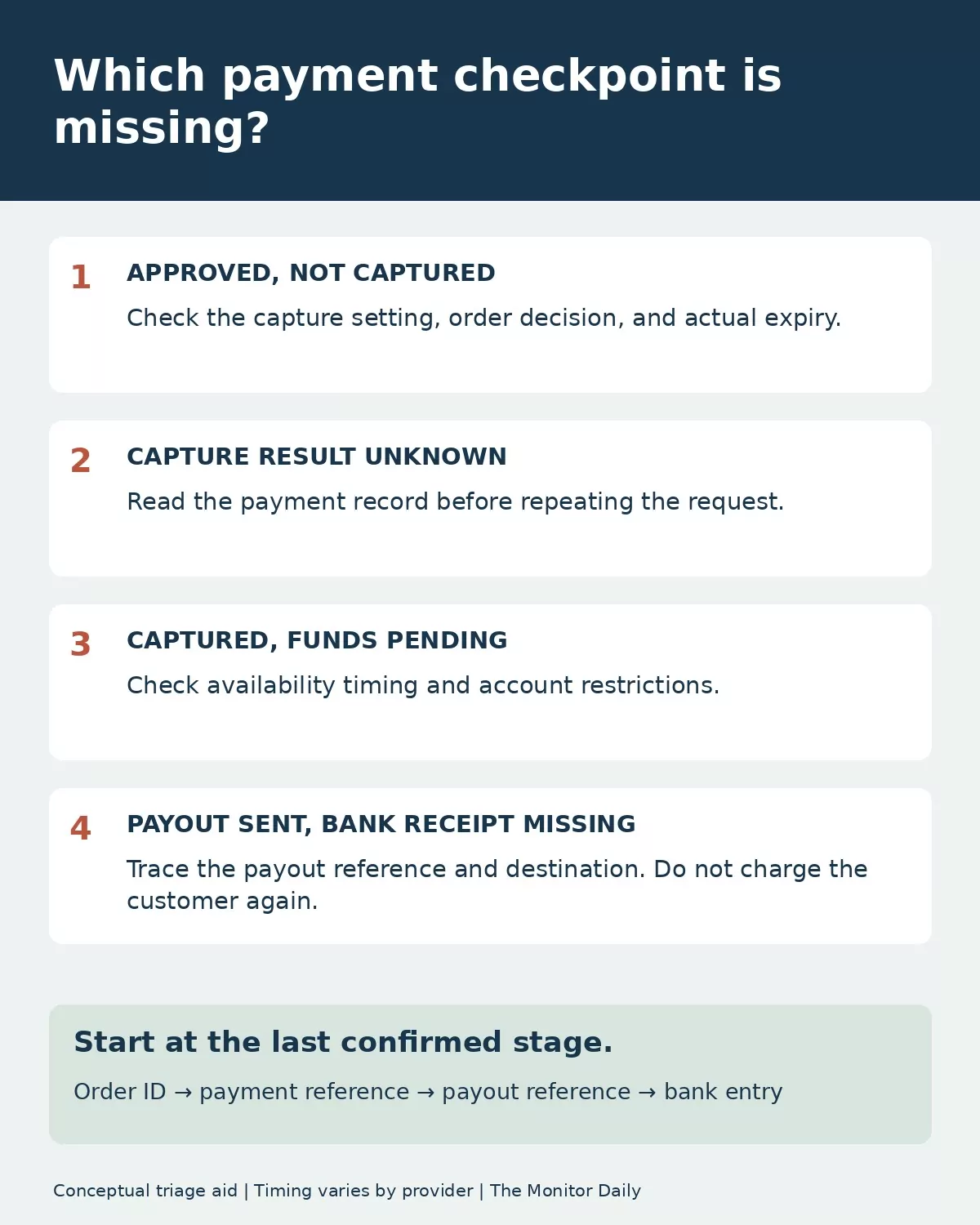
The diagram separates four exceptions that need different evidence. A missing bank deposit should be traced through the payment and payout records before anyone requests another customer payment.
Use the last confirmed stage to investigate a delay
| What you observe | First check | Useful next action |
|---|---|---|
| Approved payment, no capture confirmation | Capture setting, order decision, and expiry. | Resolve the pending capture under the provider’s supported process. |
| Capture request sent, result unknown | Current payment record and event history. | Establish whether it succeeded before retrying. |
| Captured payment, funds still pending | Availability date and account restrictions. | Use the provider’s expected timing and investigate exceptions. |
| Available funds, no payout | Payout schedule, enabled bank destination, and payout status. | Find the specific missing or blocked payout step. |
| Payout sent, bank receipt missing | Transfer reference, destination, and bank processing status. | Trace that transfer rather than creating another customer charge. |
Capture timing and payout timing are separate levers. Moving an available balance to a more frequent payout schedule does not complete an uncaptured authorization. Capturing an order also does not override a reserve or make the receiving bank post funds immediately.
Keep the investigation narrow. Staff answering a customer’s pending-payment question need the order and payment references. Staff tracing a bank deposit need the payout reference and destination. Sending everyone the same screenshot of a balance often leaves the underlying question unanswered.
Canceling a hold is different from refunding a captured charge
Before capture, the appropriate supported action may be to cancel the authorization. After capture, returning money generally involves a refund process. The customer’s bank can take time to update the visible hold or refund, so do not promise that an entry will disappear immediately after an operator clicks a button.
Communicate what the business actually did: which payment was canceled or refunded, the amount, and the date. Keep the provider reference available for a later trace. Avoid saying “the bank has returned your money” unless you have evidence of the receiving side’s result.
Capture also does not make the payment immune to a later dispute. Keep fulfillment and customer communication records after the payout arrives. The chargeback response guide explains why successful collection and a later dispute require different records.
Build a small exception queue your team can maintain
Review unresolved authorizations separately from unsettled payments and unmatched bank deposits. For each exception, record the latest confirmed state, amount, reference, responsible person, deadline or expected date, and next action. This prevents an accounts administrator from chasing a payout that the order team has never captured.
Define who can capture, cancel, or refund. Give the bookkeeping role enough visibility to reconcile without assuming it needs authority to move money. Use the actual permissions your platform supports and retain a record of consequential actions.
When an integration gives an ambiguous response, check saved state before repeating the request. A technical failure to receive a confirmation is not proof that the payment action failed. The implementation should follow the provider’s duplicate-prevention and retry guidance; the operator should have a clear escalation path when the record remains uncertain.
Review the queue after changes to the checkout, fulfillment process, or payment provider. An automatic action that worked under the old setup may no longer happen at the same event. Confirm the new behavior before assuming that the same status label has the same operational meaning.
Payment authorization vs capture: choose the next check, not another guess
Payment authorization vs capture is a practical distinction between approval and collection. Neither step alone establishes that cash is available in your business bank account. Match the order to the authorization, capture confirmation, provider availability, payout, and bank receipt.
For a missing payment, start at the last confirmed checkpoint. For a process change, decide why capture should happen at a particular event and who handles exceptions. That approach makes customer communication, fulfillment decisions, and cash reconciliation more reliable without promising an instant or irreversible payment.