
A bank notification can tell you that $12,000 has left your business account. It cannot tell you whether the money went to the right supplier, whether someone approved the transfer, or whether you will be able to recover it if something went wrong.
That distinction matters more than many business owners realize. Modern business banking platforms offer notifications for withdrawals, deposits, account balances, security changes, and payment activity. Some also flag unusual transactions or changes to payment recipients. Setting them up takes relatively little effort. Deciding which alerts deserve immediate attention takes more thought.
The essential business bank account alerts are those that warn you about unexpected money movements, changes to account access, low cash balances, failed payments, and transactions requiring review. Incoming deposits and check activity also deserve attention, depending on how your business operates.
The challenge is avoiding a stream of routine notifications that eventually becomes background noise.
A useful alert system should help you answer three questions: Did money move as expected? Is the account still under the right person’s control? And could an upcoming business obligation be affected?
Start With Money Leaving the Account
Outgoing payments deserve the closest attention because a questionable transaction may be difficult to reverse once it has been completed.
Begin by checking whether your bank offers notifications for large withdrawals, outgoing ACH payments, wire transfers, external account transfers, and debit card purchases.
These are related activities, but they don’t always carry the same risk.
A $4,000 payment to a supplier you’ve worked with for years may be entirely routine. A $90 withdrawal from an unfamiliar company could deserve investigation, even though the amount is much smaller.
That is why a single large-transaction threshold is rarely enough.
Large withdrawals and wire transfers
Set a notification threshold that reflects the size of your normal payments.
For a consulting business with modest monthly expenses, a $1,000 withdrawal might justify attention. A retailer regularly paying wholesalers may need a considerably higher threshold for routine transactions.
The important question is how often a payment exceeds your expectations, not whether it exceeds a particular dollar amount.
Wire transfers deserve their own monitoring where supported. They may involve larger payments, international suppliers, or transactions that cannot be recalled simply by asking the bank.
Chase, for example, documents configurable alerts for incoming and outgoing wires above specified amounts in its commercial banking alerts guide.
If your business rarely sends wires, consider receiving a notification for every outgoing wire rather than only those above a high threshold.
For businesses that send them frequently, payment limits and separate approval authority are often more useful than simply increasing the number of alerts.
ACH debits and smaller unexplained withdrawals
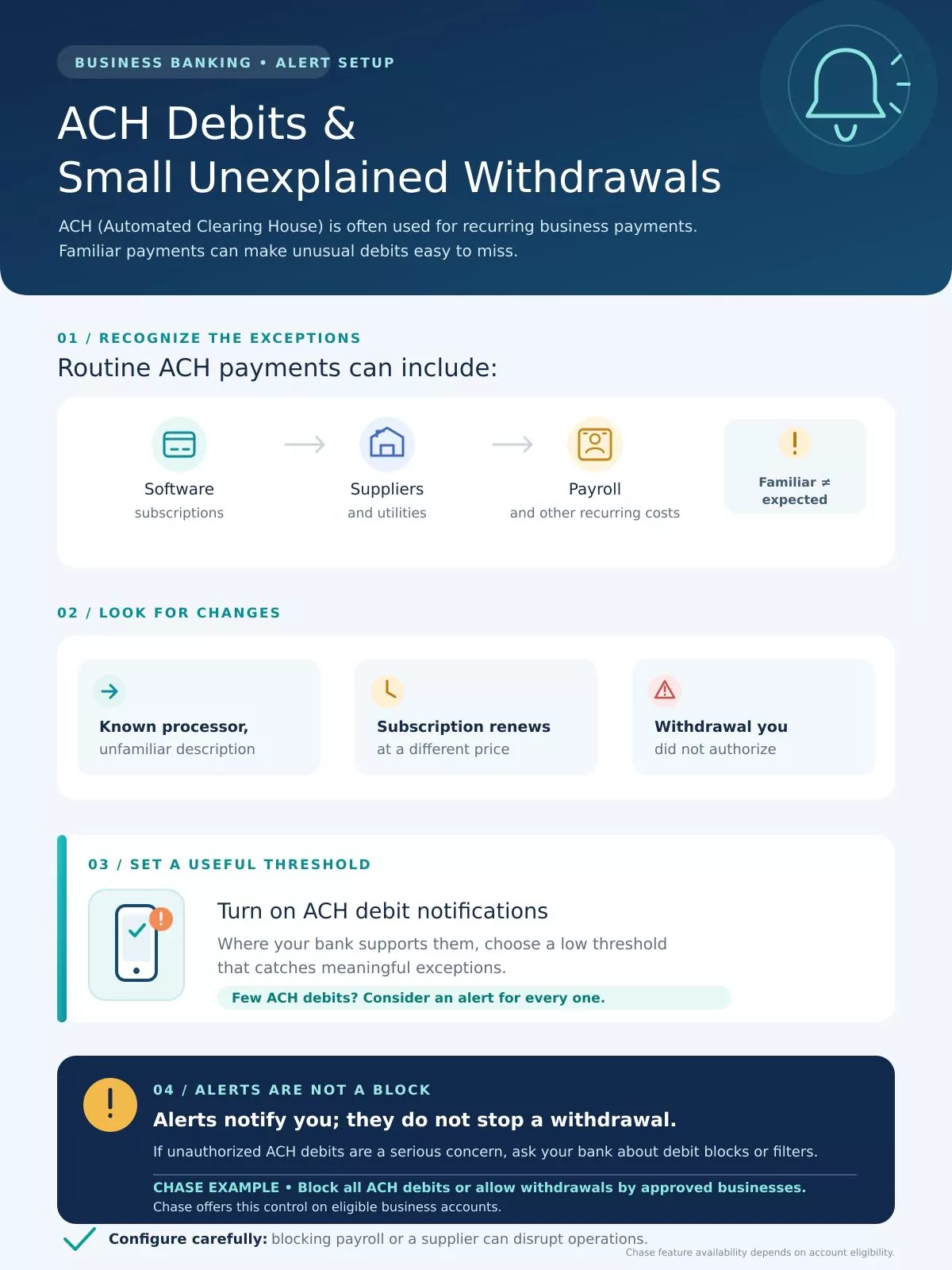
Automated Clearing House (ACH) transactions are part of everyday business banking. They may cover software subscriptions, supplier payments, utility bills, payroll, and other recurring expenses.
That familiarity can make an unusual debit easy to overlook.
A recognizable payment processor might appear under an unfamiliar transaction description. An authorized subscription may renew at a different price. There can also be genuinely unauthorized withdrawals.
Reviewing these transactions requires context.
Where your bank supports ACH debit notifications, select a threshold low enough to detect meaningful exceptions. Businesses with relatively few ACH debits may prefer notifications for every one.
Don’t rely on alerts alone if unauthorized ACH withdrawals are a serious concern.
Some banks offer ACH debit blocks or filters that restrict which organizations may debit the account. Chase, for instance, describes a service that can block ACH debits or allow withdrawals from approved businesses.
Such controls need careful configuration. Blocking an authorized payroll provider or supplier could create an operational problem of its own.
Watch for Changes That Could Put the Account at Risk
A suspicious withdrawal is often the final visible step in a longer problem.
Before money disappears, someone may have accessed an account, changed credentials, added a banking user, or altered payment instructions.
That makes security and account-administration notifications particularly important.
Look for alerts involving password or user ID changes, unfamiliar sign-ins, new authorized users, modifications to account permissions, or changes to contact information.
Not every bank offers each of these notifications, and some security messages are automatically enabled rather than optional.
If a password-change message arrives when nobody in your company has requested one, investigate through the bank’s official app or website. The same applies to an unexpected administrative user or a changed contact number.
There is an important practical issue here: a small business might give its owner, accountant, and office administrator access to the same banking login. That arrangement makes suspicious activity harder to trace.
Where available, individual user profiles with limited permissions are a better approach. The person who reconciles transactions does not necessarily need authority to initiate or approve outgoing wires.
A changed supplier bank account deserves special attention
Consider a routine supplier payment.
Your finance employee receives an email explaining that the supplier has changed banks. The company name is correct, the invoice matches an existing purchase, and the email refers to an ongoing business relationship.
Everything may look familiar.
Yet the payment instructions could have been altered by someone impersonating the supplier or compromising an email account.
The FBI identifies this type of payment redirection as a common form of business email compromise.
Some commercial banking platforms provide notifications when new payees are added or payment details change. Chase’s commercial banking documentation, for example, includes certain notifications for employee and vendor payees added by subusers.
Enable such notifications when available, particularly when multiple employees can manage beneficiaries.
But a bank alert cannot confirm that a supplier’s new account details are genuine.
Establish a straightforward rule:verify any change to payment instructions through a trusted contact method already on file.
An email reply to the same message requesting the change is not independent verification.
This simple separation between requesting a payment change and approving it can be more valuable than an elaborate collection of notifications.
Low-Balance Alerts Should Reflect Your Bills, Not an Arbitrary Number
A business account can contain a substantial amount of money and still be short of what the company needs over the next few days.
Available cash and upcoming obligations are different things.
A balance of $15,000 may look comfortable until payroll, rent, and supplier payments begin clearing.
Low-balance notifications are useful because they can prompt an earlier review of the company’s immediate cash needs. The problem is that business owners sometimes choose an arbitrary alert threshold without connecting it to the actual payment schedule.
A better approach is to consider the obligations due before the next reliable cash inflow.
Take a hypothetical business with these upcoming expenses:
| Payment obligation | Amount |
| Payroll due this week | $9,000 |
| Office rent | $3,500 |
| Supplier payment | $2,000 |
| Additional cash cushion | $2,500 |
| Illustrative alert threshold | $17,000 |
For this particular business, an alert when the available balance falls below $17,000 would prompt a review of whether those obligations can still be covered.
It is not a universal recommended banking threshold. Another company could have entirely different obligations and available reserves.
The threshold also needs to change when the payment cycle changes. A balance alert set for payroll week might be unnecessarily noisy afterward.
There is another complication: the balance displayed by your bank may not account for every outstanding check, scheduled transfer, card authorization, or pending transaction.
That is why bank alerts work better alongside a short-term cash-flow forecast than as a replacement for one.
Don’t ignore overdraft and insufficient-funds notifications
Low-balance warnings provide an opportunity to investigate before an expected payment creates a problem.
Overdraft and insufficient-funds notices indicate that a different threshold has already been reached.
Those messages deserve attention even when the business has an overdraft facility or expects new deposits soon.
Find out which transactions have been affected. An unsuccessful payment to a software provider is inconvenient; a failed payroll transfer can be significantly more disruptive.
The response should depend on the payment involved, not simply the account balance displayed at that moment.
Payment Failures Can Matter More Than Payment Confirmations
Businesses often monitor whether a payment has been sent while paying less attention to what happens afterward.
A payment instruction may be submitted successfully but later fail, be returned, or remain delayed.
Where supported, activate alerts for returned ACH payments, unsuccessful transfers, insufficient-funds events, and delayed wires.
Chase’s commercial banking alert documentation includes examples of payment failure notifications, returned-check notices, and delayed-wire alerts. Specific availability depends on the account and services being used.
When a payment fails, resist the temptation to resend it immediately.
First determine why it failed and whether the original transaction could still complete. Otherwise, a second attempt may create a duplicate payment.
A returned payment caused by an incorrect account number needs a different response from one rejected because sufficient funds were unavailable.
For payroll and essential supplier payments, make sure the notification goes to someone who can investigate and coordinate the correction promptly.
A founder who receives the alert while traveling but has no access to the supporting transaction records may be less useful than the finance employee responsible for resolving the issue.
Incoming Deposits Are Worth Monitoring, Too
Money arriving in the account is usually welcome news. It can also reveal a discrepancy that needs attention.
An incoming deposit alert can help a business identify customer payments, bank transfers, and expected funds from payment processors.
This becomes especially useful when the company depends on a few large customers or operates with tight working capital.
Suppose an invoice for $8,000 is due, but the incoming deposit notification shows $6,000. The payment may be partial, or there may be a processing issue. Either way, the finance team should reconcile the deposit before treating the invoice as settled.
A notification that funds were deposited also does not necessarily mean every dollar is immediately available for use.
Compare incoming transactions with the bank’s available-balance information and the relevant invoice or settlement report.
For retailers and e-commerce businesses, there is another set of notifications to consider outside the deposit account itself.
Merchant-services platforms may provide alerts for payment settlements, disputes, and chargebacks. Chase’s merchant-services support documentation, for example, describes deposit and chargeback notifications.
Those messages may require action through the merchant portal rather than the bank’s ordinary account dashboard.
A chargeback notice can be particularly time-sensitive because the payment provider may set a deadline for responding to the dispute.
If Your Business Writes Checks, Look Beyond Ordinary Notifications
Paper checks still create an exposure that digital transaction alerts do not fully address.
A standard check-clearing notification tells you that a check has been processed. It may help with reconciliation, but it doesn’t necessarily give you an opportunity to intervene before payment.
Businesses issuing significant numbers of checks should ask their bank about check-monitoring services or Positive Pay.
These services can offer a different level of control.
Under a typical Positive Pay arrangement, a business supplies information about checks it has issued. The bank compares checks presented for payment against that information and identifies exceptions for review.
For example, a check presented with an amount that does not match the business’s issued-check record may be flagged.
Chase distinguishes its Check Monitoring service from Check Protection Services, which it describes as a Positive Pay offering.
Both can be useful, but eligibility, fees, review procedures, and cutoff times vary. A missed decision deadline can have consequences under the service terms.
If someone is responsible for reviewing check exceptions, arrange coverage for days when that person is absent.
An exception alert received at 10 a.m. is not useful if nobody opens it until the following morning and the bank’s response window has closed.
Which Alerts Should You Enable First?
The precise settings will depend on your bank, account type, transaction volume, and the services your business uses.
Still, most small businesses can prioritize their monitoring without an elaborate security program.
| Alert or monitoring event | Why it matters | Suggested priority |
| Unexpected outgoing wires and large transfers | May reveal an unauthorized or misdirected payment | Immediate investigation |
| Account access, security, or user changes | May indicate changes in who controls the account | Immediate investigation |
| New payees or payment-instruction changes | Can expose unauthorized recipient changes | Verify before further payment |
| Unfamiliar ACH debits | May reveal incorrect or unauthorized withdrawals | Same-day review |
| Low balance and overdraft | Signals potential cash-flow or payment disruption | Review according to payment urgency |
| Failed or returned payments | May interrupt payroll, suppliers, or services | Prompt operational follow-up |
| Incoming deposits and settlements | Supports cash reconciliation and receivables tracking | Routine reconciliation |
| Check and ACH control exceptions | May require a decision before a bank deadline | Review within the bank’s required window |
These priorities are a suggested internal workflow, not guaranteed notification-delivery times or universal bank requirements.
For many small businesses, the first four categories deserve the strongest attention because they relate directly to suspicious money movements and account control.
The remaining alerts help protect day-to-day operations.
If your bank doesn’t offer one of these specific notifications, consider whether a daily transaction report, account review, or separate treasury-management control can address the same need.
The Problem With Turning On Everything
More notifications do not necessarily produce better oversight.
An owner receiving dozens of routine deposit alerts might eventually start ignoring the banking app. Important notifications can then disappear into the same stream as ordinary activity.
A more practical arrangement separates three types of messages.
Critical security and payment alerts should reach someone capable of investigating promptly. These include unfamiliar transfers, unexpected changes to banking access, and transactions requiring an immediate approval decision.
Operational alerts belong with the employee responsible for cash management, payroll, or accounts payable. These include low balances, payment failures, and other cash-flow exceptions.
Routine activity notifications can support reconciliation without interrupting the owner throughout the day.
In a one-person business, all three responsibilities may belong to the same person. Even then, separating urgent phone notifications from routine email summaries can make the system easier to use.
For a company with a finance team, assign responsibility according to roles rather than simply forwarding everything to every employee.
This also means planning for absences.
If a bank sends an important exception to one employee who is on leave, the problem is not the notification technology. It is the lack of backup coverage.
An Alert Is Not the Same as Fraud Prevention
There is a limitation worth understanding before relying on any banking notification system: an alert may arrive after the relevant transaction or account event has already occurred.
Commerce Bank’s digital alert guidance, for example, expressly describes its ordinary account alerts as notices sent after the triggering event. Other banks and products may use different schedules and mechanisms.
An email about a completed transfer cannot retroactively stop that transfer.
Delivery can also be delayed by banking systems, internet connectivity, mobile notification settings, or other technical problems.
That makes it important to distinguish three separate functions:
- Alerts tell someone about an event or condition.
- Approval controls determine who can authorize a payment or administrative action.
- Transaction restrictions can limit or block certain activities under the bank’s service rules.
These functions complement each other.
A business might receive an alert about an unusually large payment while also requiring two authorized employees to approve certain wire transfers.
Similarly, ACH debit restrictions may prevent selected withdrawal requests rather than simply notifying the owner afterward.
The strongest setup depends on the company’s size and risks, but alerts should never be the only safeguard.
The Federal Trade Commission also advises businesses to maintain clear purchase and invoice approval procedures. Its small-business scam guidance explains how fraudulent invoices can be made to look like ordinary bills.
A well-configured bank alert cannot correct a payment that an employee knowingly authorized after being deceived by a convincing fake invoice. That risk has to be addressed before payment approval.
What to Do When a Banking Alert Looks Suspicious
The first decision is whether the alert corresponds to an authorized business event.
Open the bank’s app directly or enter its official website address. Don’t rely on a login link in an unexpected text or email, even if the message appears to come from the bank.
Compare the transaction details with your records. Check the amount, recipient, date, and person who initiated or approved it.
If the activity remains unexplained, contact the bank promptly using a verified number or secure support channel. Ask what protective actions are available for that transaction or account.
For suspected unauthorized transfers, the bank may be able to explain available reporting, restriction, dispute, or recall procedures. Those options depend on the payment method and circumstances; recovery should never be assumed.
If the incident involves a fraudulent wire request or business email compromise, the FBI recommends immediately contacting the financial institution and reporting the incident to the Internet Crime Complaint Center.
Keep the relevant transaction identifiers, emails, authorization records, and the time the incident was discovered. These details may be important when the bank investigates.
US business owners should also be careful about assuming that consumer banking protections apply to commercial accounts. The Consumer Financial Protection Bureau’s Regulation E definition of a covered account generally concerns accounts established primarily for personal, family, or household purposes.
Business-account rights and responsibilities may differ according to the applicable law, account agreement, and payment method. Review your bank’s reporting procedures and seek qualified advice where necessary.
Make the System Work Before You Need It
Once the alerts are configured, the final step is to ensure that someone actually receives and acts on them.
Check the phone numbers and email addresses associated with the account. Review notification permissions on relevant devices. Confirm that the intended employee has access to the information needed to investigate an alert, without granting unnecessary payment authority.
Where appropriate, verify the setup using legitimate account activity or a bank-provided test facility.
Then agree on a simple responsibility: who checks the alert, who investigates the transaction, and who contacts the bank if something is wrong?
This doesn’t require a complicated procedure for every notification. A small company might manage routine deposits during daily reconciliation while directing unexpected transfers straight to the owner or finance manager.
Review the settings when business circumstances change. A new payroll cycle, additional employees, international suppliers, or higher transaction volumes may make an old alert threshold less useful.
It is also worth checking your configuration when switching banks or opening another operating account. Features that were available through one provider may not be included with another.
A business banking alert system earns its value when it changes what someone does next.
The owner doesn’t need to know about every dollar the moment it moves. They need to know when money moves unexpectedly, when account access changes, and when ordinary obligations are at risk.
The best alert is one that reaches the right person while there is still something useful they can do about it.