

To clean duplicate contacts in your CRM, export the affected records, identify which entries represent the same person, choose the values and relationships to retain, and merge a small reviewed batch before proceeding. A matching name or email address is a clue, not sufficient proof in every case. Preserve subscription restrictions, activity history, ownership, and connected-system identifiers so the cleanup improves the customer record without breaking the next sales or service action.
For a small business, the immediate symptom may be two reps calling the same buyer or a customer appearing in two mailing segments. Deleting the less complete row can seem efficient. It can also remove the only record linked to an open deal. Treat cleanup as a controlled change to a working system, with an exception queue for uncertain matches.
1. Define what counts as a duplicate contact
A contact normally represents a person. A company, deal, subscription, and support ticket represent different things, even when they share an email address. First confirm the object you are cleaning. Two opportunities for the same buyer are not necessarily duplicate deals, and two buyers at one employer should not become one contact.
Write a simple matching policy before opening a bulk merge screen. Use a trusted external customer identifier where your systems support one, then compare additional identity evidence. An email match may be useful, but shared inboxes, recycled addresses, and employment changes need separate judgment. A name match alone belongs in the review queue.
| Candidate pair | What to check | Working decision |
|---|---|---|
| Same person, identical individual email, consistent history | Conflicting customer IDs, employer history, and linked records | Potential merge after review |
| Same name, different companies and phone numbers | Independent identity evidence | Keep separate unless evidence establishes a match |
| Two people using purchasing@ the same company | Whether the mailbox represents a team or named individuals | Do not merge people merely because the address matches |
| One person using an old and a new work address | Verified continuity and which employment relationship each record describes | Resolve the identity and relationship model first |
| Repeated row from a recent import | Source batch, original record key, and destination record ID | Review the import rule before fixing individual records |
These are operational review rules, not a product’s automatic matching specification. A duplicate detector can suggest candidates without determining whether the underlying business relationship is the same.
2. Make a recoverable snapshot and limit access
Export the affected records with their current CRM IDs, relevant field values, owners, and linked-record identifiers. Include subscription or suppression information where the export supports it. Store the file securely and record when and from which account it was exported. Confirm what the export omits: attachments, historical field changes, relationships, and activity timelines may need separate backup tools.
An export is a useful reference; it is not proof that a merge can be reversed. Check the current product documentation and the recovery options available in your actual account. HubSpot, for example, documents that merged records cannot be unmerged. Creating another contact afterward is not the same as restoring the original relationships and history.
Keep the cleanup workspace restricted to the people performing and reviewing the change. The FTC’s guidance on controlling access to customer information supports limiting access to legitimate business needs. A contact export should not become a widely shared attachment simply because it is temporary.
Set a review date for the snapshot and working files under your retention policy. Keep the change record you need, while avoiding unnecessary copies of personal information. The FTC’s personal-information protection guide explains why collection, retention, access, and secure disposal belong in the same process.
3. Stop the source from recreating the problem
Look at when the candidate records were created and which integration or import created them. If duplicates reappear after every webinar upload, merging yesterday’s rows will not fix tomorrow’s import. Inspect the matching key, field mapping, blank-value behavior, and create-versus-update setting at that entry point.
Use the same care when contacts synchronize with an email platform or a customer database. Decide which system owns each identifier and how the connector handles a merged contact. Where a controlled pause is appropriate, coordinate it with the process owner, record the start point, and plan how queued changes will be reconciled. Do not disable a business-critical integration without understanding what depends on it.
Before the next upload, follow a documented CRM field-mapping process. Matching and overwrite rules should be explicit. A column labeled Customer ID does not become a unique matching key just because it exists in a spreadsheet.
4. Choose the surviving record and resolve conflicts
The oldest record is not automatically the best survivor, and the newest value is not automatically accurate. Start with the record that must remain connected to important workflows and external systems, then inspect the merge tool’s actual behavior. Some products retain a primary ID; others have different rules. Verify the outcome instead of assuming that all references will continue working.
For each pair, record the two source IDs, the intended surviving record, the reason they represent one person, and each conflicting value that needs a decision. A verified phone number should not be replaced by an empty import cell. An ownership conflict should go to the relevant sales or service lead.
| Information | Decision before merging | Check afterward |
|---|---|---|
| Email addresses and phone numbers | Retain verified contact details and distinguish current from historical values | The intended address and number appear in the right fields |
| Company and deal associations | List the relationships the combined record must retain | Open deals and relevant company relationships remain accessible |
| Owner and open tasks | Resolve accountability and overlapping follow-up | A named owner has the correct outstanding work |
| Marketing restrictions | Preserve applicable opt-outs and suppression history; resolve conflicts before sending | A merge has not made a restricted address eligible for a campaign |
| External identifiers | Check connector mapping and the surviving identity | The next sync updates the intended contact |
Keep restrictions attached to the relevant address and context; do not casually copy permission from one address to another. When the records disagree, hold campaign eligibility until the responsible owner resolves the conflict. A merge is not a new subscription event.
5. Clean duplicate contacts in your CRM with a small pilot
Choose a few reviewed pairs that represent different situations: a straightforward repeat, a field conflict, and a contact linked to an active deal. Leave ambiguous identities out. Write down the expected fields, associations, restrictions, and owner before merging.
Perform the first merge through the supported account interface. Read the confirmation screen and property choices carefully. Open the resulting record afterward, then check the linked deal, the task list, and the next supported connector update. Where customer-facing automation could run, use an approved test environment or a controlled procedure that prevents unintended messages.
If a merge request times out or the interface appears stuck, inspect both original IDs and the resulting record before submitting again. Record whether the action finished, failed, or remains uncertain. An ambiguous save is a reason to investigate, not to repeat the action blindly.
The pilot passes when the saved state matches the expected state. A success banner alone does not establish that a subscription restriction or external association survived. If a material check fails, stop the batch and investigate that failure on the same records.
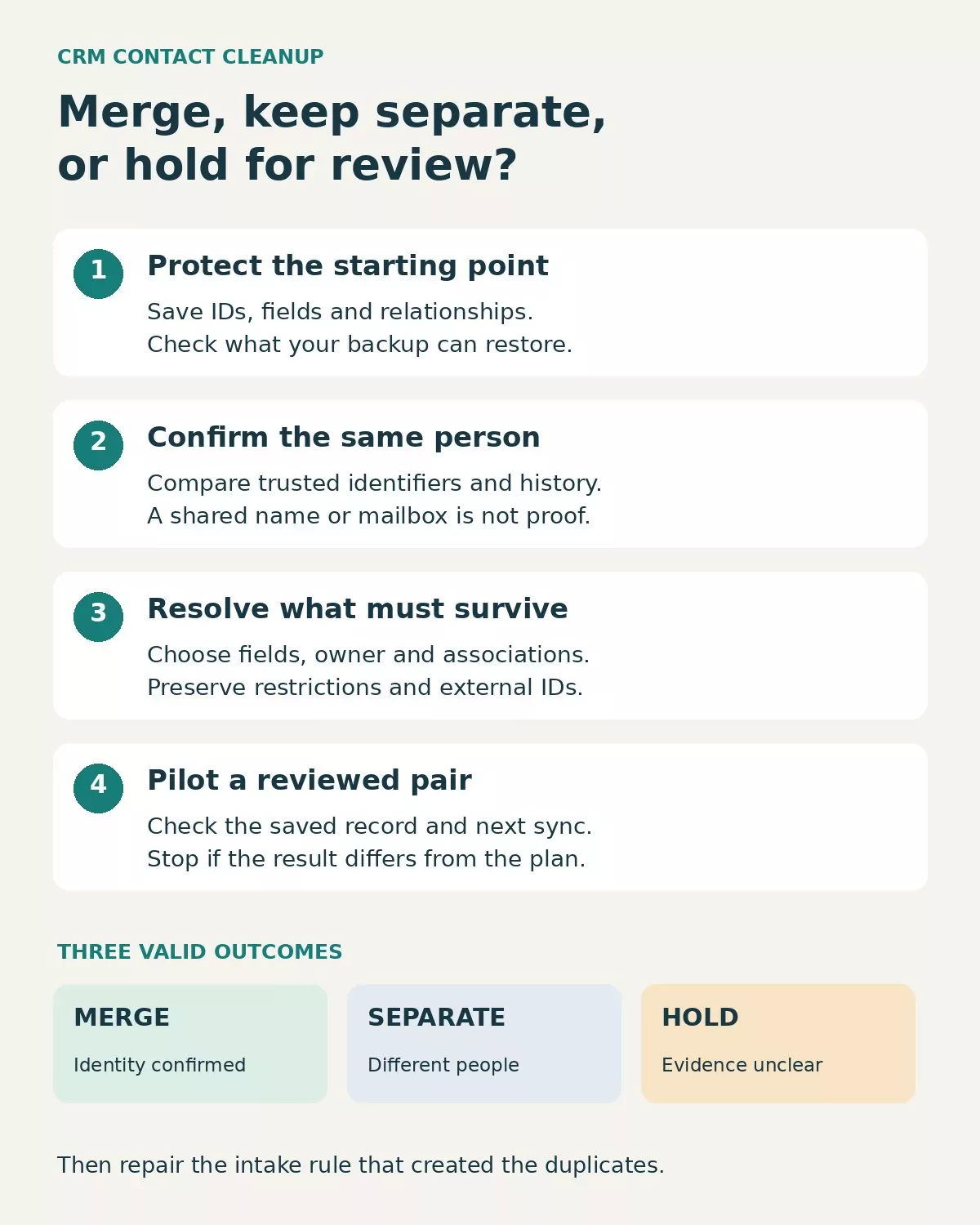
The review has three legitimate outcomes. Only confirmed duplicate identities move to merging; uncertain matches remain separate while someone resolves the evidence.
6. Reconcile the batch and retain an exception queue
Keep three outcomes separate: merged after verification, confirmed separate people, and unresolved. The unresolved queue needs a reason and an accountable reviewer. A smaller unresolved queue is useful progress even when it does not reach zero.
For an illustrative batch, suppose 20 records form 10 isolated candidate pairs. Review confirms that six pairs are duplicates, two pairs are different people, and two remain unresolved. Merging the six confirmed pairs removes six redundant records, leaving 14 records in that batch. This is an example of the arithmetic, not a measured cleanup result or a target merge rate.
Compare the expected record reduction with the actual result, allowing for any separately recorded creates or deletes. Then inspect the relationships and restrictions that counts cannot prove. Ten fewer rows can still conceal one incorrectly combined customer.
Update the team’s CRM and email synchronization workflow with the chosen matching rule and the post-merge checks. Verify your own connector’s behavior: synchronization support and timing vary, and a procedure from another setup is not evidence that yours handles merges safely.
Prevent the next duplicate without blocking legitimate contacts
At each intake point, define whether the operation creates a contact or updates an existing one, which identifier it uses, and what happens if several records match. Route uncertain matches to review rather than selecting the first result. Preserve source identifiers through exports and imports where supported.
Give the process an owner and review a sample after changes to forms, imports, or integrations. Track where duplicates originate and whether false matches occur. Avoid solving the problem by making a broad field such as company domain unique for people: multiple legitimate contacts can share that domain.
This guide uses documented merge behavior and a reasoned review workflow. The example records and batch calculation are illustrative; no customer database was processed for the article. Product menus, permissions, backup coverage, and merge effects must be checked in the account where the change will happen.
Clean duplicate contacts in your CRM without losing the relationship
To clean duplicate contacts in your CRM, make identity verification the first decision and record deletion the last consequence. Protect the snapshot, settle field and permission conflicts, verify a small pilot, and reconcile the saved result before expanding the batch. Keep uncertain people separate until the evidence supports a merge, and repair the intake rule that created the duplicates.