
The best free invoicing software for freelancers depends on the work around the invoice. Zoho Invoice is a strong starting point for service billing with time and project features; Wave Starter suits freelancers who want basic invoicing alongside bookkeeping; and standard PayPal Invoicing fits a payment-centered workflow. Compare the free tier’s limits and the cost of collecting money before choosing. A $0 software subscription does not mean a $0 payment-processing bill.
This comparison is for US solo freelancers billing clients for services. It examines three distinct approaches rather than declaring a universal winner. A consultant sending a handful of retainers has a different problem from a designer managing several active projects or a contractor whose clients require purchase-order references.
Free invoicing software for freelancers: the practical comparison
| Option reviewed | Reason to consider it | Main boundary to understand |
|---|---|---|
| Zoho Invoice | Service invoicing, time tracking, projects, and recurring bills | Published limits: 500 invoices per year, two users, three projects; online payment-provider fees are separate |
| Wave Starter | Basic invoices and bookkeeping in one environment | $0 subscription and unlimited invoices; advanced automation and account features can require payment services, Pro, or add-ons |
| Standard PayPal Invoicing | Creating invoices around a PayPal payment workflow | Standard help describes no setup or monthly fee; payment fees apply, and a separate paid Invoice Subscription Service exists |
The comparison uses official US pricing, product, and help pages checked November 25, 2026. Selection criteria were ongoing invoicing without a required software subscription, a useful service-business workflow, and identifiable constraints. These are documentation-based recommendations, not results from opening accounts, sending live invoices, or timing customer payments. Trials and paid-only packages are outside this comparison.
Zoho Invoice: start here for service-billing detail
Zoho Invoice combines quotes, invoice creation, recurring billing, reminders, expense recording, time tracking, and project tools. That combination makes it a sensible first option to evaluate when the amount you bill depends on hours or a defined project. It offers a customer portal and PDF or email invoicing, so the workflow can extend beyond producing a document.
The free package is bounded. Its US pricing page lists up to two users, three projects, and 500 invoices per year, with Zoho Invoice branding. A freelancer with many concurrent projects should weigh the project limit alongside the invoice allowance. A generous invoice count does not compensate for a project structure that cannot represent the work.
Zoho’s help documentation says usage allowances reset annually according to the organization’s creation date and are shown in Usage Stats. Keep that distinction in mind when planning a busy season: an annual allowance is not necessarily a calendar-year allowance.
For an illustrative capacity check, 30 invoices each month would total 360 over 12 months, while 45 each month would total 540. Against a 500-invoice allowance, the second workload exceeds it by 40. This is planning arithmetic, not a test of how drafts, adjustments, or other document types count. Confirm the applicable counting rules before migrating a high-volume workload.
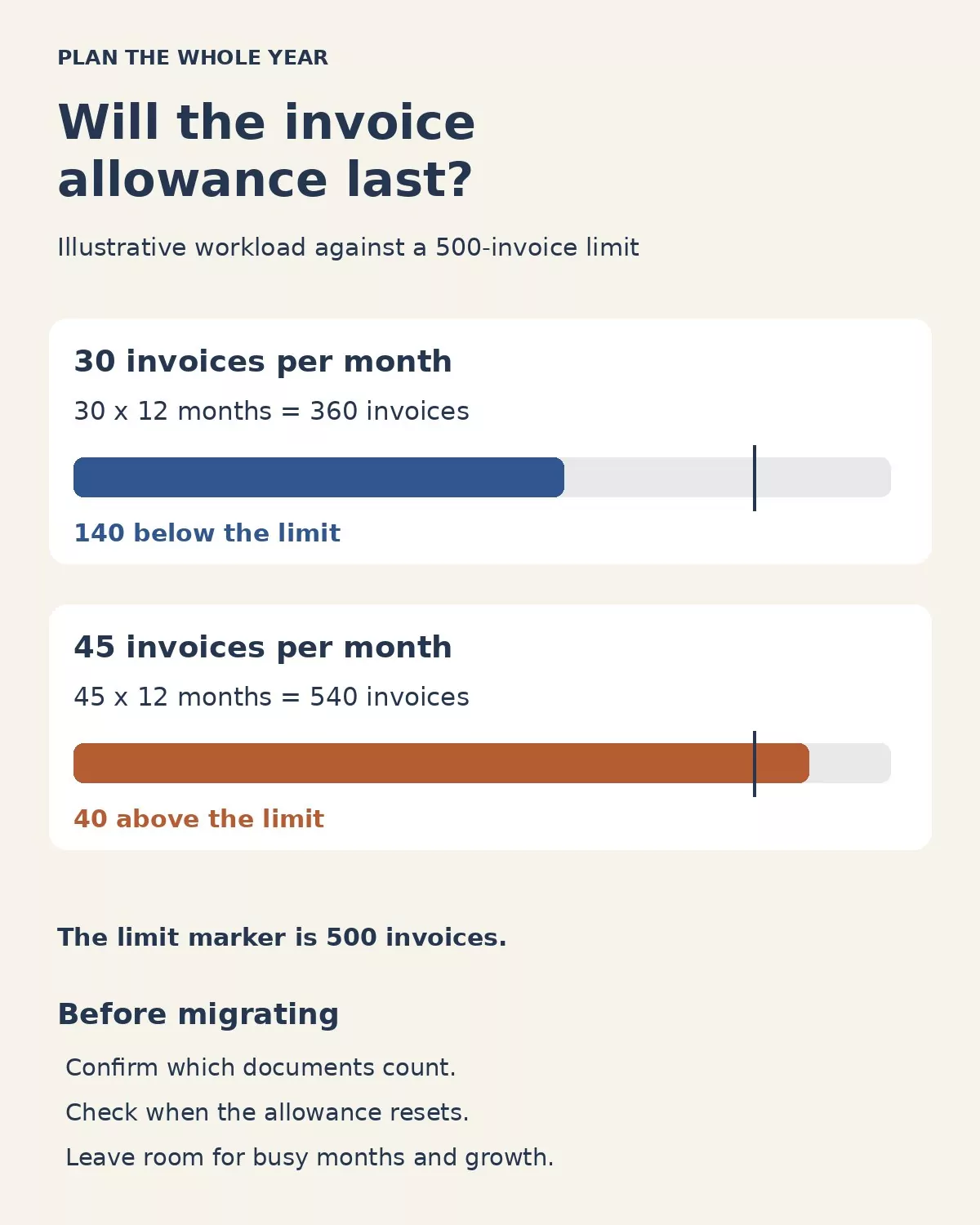
Estimate a full allowance period, including busy months, rather than treating the invoice limit as a monthly quota.
Wave Starter: useful when invoicing shares a bookkeeping workflow
Wave describes Starter as free basic accounting and invoicing, and its pricing page lists unlimited estimates, invoices, bills, and bookkeeping records. That is a relevant alternative when invoice volume matters more than project tracking. It can also reduce the number of places in which a solo operator maintains billing and basic bookkeeping information.
Keep Starter separate from Pro. The free help page identifies bank-transaction auto-import, receipt scanning, and automatic transaction merging and categorization as paid-plan or additional-feature territory. Do not plan a fully automated bookkeeping process from the word “free” alone.
Some invoicing functions on Wave’s comparison page are conditional on online payments, while Pro has a wider feature set. In particular, do not assume every reminder, branding, delivery, or collaboration control is included unconditionally in Starter. Evaluate the exact task you need rather than treating the product’s full feature list as the free plan.
The practical fit is a freelancer willing to accept the boundaries of basic invoicing and bookkeeping. If your requirement is hands-off bank imports, extensive collaboration, or a specific automated follow-up process, compare the paid upgrade and alternatives before committing your records.
PayPal: evaluate the payment route as carefully as the invoice
PayPal’s standard invoicing help says there are no setup or monthly fees, with fees charged when customers pay online. Its documentation also describes partial payments and reminders. For someone already organizing customer payments in PayPal, building invoices into that process may be more convenient than introducing another billing system.
That is a workflow recommendation, not a claim that every PayPal feature is free. The US merchant fee page, updated November 23, 2026, separately lists an Invoice Subscription Service at $14.99 per month. This comparison covers standard invoicing, not that paid subscription. Check any subscription offer and its terms before activating additional functionality.
Payment method changes the cost. The current US invoicing fee table lists 3.49% plus the fixed fee for PayPal Checkout, Venmo, and guest checkout; 2.99% plus the fixed fee for standard card payments and specified wallets; and 1% capped at $10 for Pay by Bank. The USD fixed fee is $0.49. International transactions and currency conversion require a separate cost assessment.
For a hypothetical $500 domestic USD invoice paid through PayPal Checkout, the listed percentage and fixed fee produce $17.94 in processing cost: $500 × 3.49% + $0.49. At the listed Pay by Bank rate, the same amount produces $5 before any other applicable charges. These are calculations from the published schedule, not actual transaction results or a promise that a payment method will be available to every account or customer.
Choose around the invoice your client will accept
Before opening another app, check the client’s submission requirements. A purchasing department may need a purchase-order number, project code, agreed milestone, or a supplier portal submission. If your invoice cannot pass that process, a payment button and a polished template will not solve the delay.
Use a clear service invoice with an identifiable invoice number, the work being billed, the amount, and agreed payment terms. Keep those fields consistent across the PDF, email, and any client portal. Do not issue a second bill merely because the client asks you to upload the first one through a different channel.
A simple decision sequence helps: identify the billing detail you need, estimate annual document volume, decide how clients will pay, and then check the export and follow-up workflow. Zoho is worth examining first for time-and-project billing within its limits; Wave for basic bookkeeping plus invoice volume; and PayPal for a payment-centered process where its fees and standard features fit.
Calculate the cost beyond the subscription
Write down your likely payment mix rather than multiplying all revenue by a single headline rate. Separate card receipts, bank payments, international receipts, and payments made outside the invoicing system. Include any optional subscription, receipt capture, additional user, or integration you actually need.
Also account for work you will still perform. If a client pays by a separate bank transfer, someone must match the receipt to the invoice and update the balance. If you use two systems, decide which one owns invoice numbers and customer balances. Avoid letting both create the same recurring bill.
Payment confirmation and cash available in your bank account are different checkpoints. Do not build a cash plan around a marketing claim of faster payment. Use actual transaction and deposit records, and investigate pending or reversed payments on the relevant account.
Test the workflow before moving your billing history
Use an authorized draft or test setup before any customer-facing send. Recreate one ordinary service invoice and one awkward case, such as a partial payment, a disputed line, or a client with a required purchase-order reference. Verify the recipient view and the total, then inspect how the record changes when the balance changes.
For follow-up, confirm the schedule, the recipient, and the event that stops the reminder. Our invoice-reminder setup guide explains why a payment made outside the system needs to be reflected before an automated message is trusted. Check the current free-plan entitlement as well as the reminder behavior.
Export a small sample of your own authorized records and open the files. Look for invoice identifiers, issue and due dates, line details, customer names, taxes where applicable, payments, and outstanding amounts. A PDF archive and a structured export serve different purposes; a downloadable invoice is not proof that every relationship can be recreated elsewhere.
Keep usable records and protect client information
The IRS recordkeeping guidance says a business can use a system suited to its needs that clearly shows income and expenses. Choose the app’s record workflow for that practical requirement rather than assuming that generating an invoice establishes complete books or tax compliance. Retention depends on what a record supports and the circumstances.
Limit the information in invoices and exports to what the business process needs. Restrict access to working copies and backups, especially when they contain client addresses or payment details. The FTC’s business data-protection guidance connects collecting only necessary information with protecting and properly disposing of it. A free account does not remove those responsibilities.
Which free invoicing software for freelancers should you choose?
Choose free invoicing software for freelancers by matching a complete billing task to the actual free tier. Start with Zoho Invoice for service-billing depth within its usage limits, Wave Starter for basic bookkeeping and invoice volume, or standard PayPal Invoicing when the payment workflow is the main attraction. Then check the bill you will pay, the records you can recover, and the work that remains manual. The right choice is the one that fits those requirements without depending on an upgrade you have not budgeted for.