

The best CRM for small business is the one your team can use to capture an inquiry, assign an owner, complete the next action and recover the information later. For a five-person business, start with those jobs and the people doing them. Then compare the lowest plan that supports the whole workflow—not the lowest price displayed beside a product name.
A CRM that looks inexpensive can become costly when email automation, reporting or access controls require another tier. A more capable system can also be a poor purchase if nobody has time to configure and maintain it. The decision is about a workable operating model, not a universal winner.
This documentation-based comparison was researched on November 17, 2026. It compares Pipedrive, Zoho CRM and HubSpot through a proposed five-person-team buying exercise. The examples and acceptance tests are illustrative; no five-person hands-on trial or measured performance result is claimed. Published pricing and plan documentation are distinguished from calculations and editorial judgments.
1. Define what “best CRM for small business” means for your team
Write down the failure you want to fix. “We lose track of proposals after the first conversation” is useful. “We need a modern CRM” is too broad to guide a purchase.
For a small service company, a minimum workflow might be: capture an inquiry, identify an existing company, assign a responsible seller, schedule the next task, record a response and report which opportunities have no next action. Add requirements only when they support an actual decision or obligation.
Separate essentials from preferences before opening a demonstration. If a missing capability would stop the business process, it is a requirement. A dashboard color or an impressive AI summary may be convenient, but it should not outweigh a failed permission or data-export check.
| Proposed role in a five-person business | Work to demonstrate | Seat question |
|---|---|---|
| Owner or manager | Inspect pipeline and overdue work | Does this person only view reports, or also edit and approve changes? |
| Seller one | Manage assigned opportunities and follow-ups | Which paid sales features are required? |
| Seller two | Take over an opportunity when a colleague is unavailable | Can ownership and access transfer without losing history? |
| Coordinator | Capture inquiries, check duplicates and arrange appointments | Does basic editing require a paid seat? |
| Operations administrator | Maintain fields, imports, permissions and exports | Which administrative actions are included at the proposed tier? |
This is a role model, not a mandatory staffing plan. One person may perform several jobs. Five employees do not automatically need five premium selling licenses, but a view-only account cannot replace an editing account when someone needs to change records.
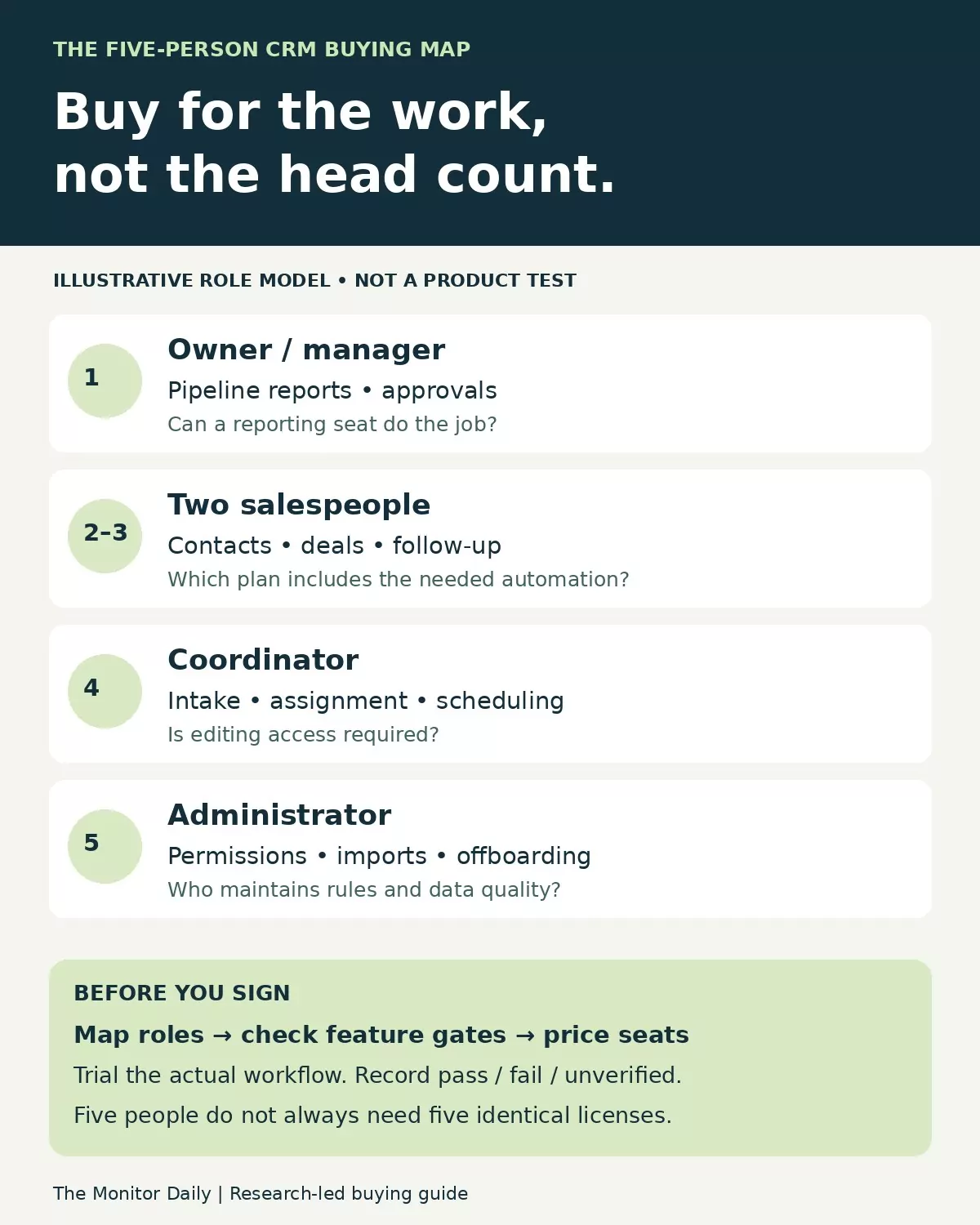
The map separates selling, coordination, reporting and administration. Verify the access and feature requirements for each job before treating five employees as five identical paid seats.
2. Compare three different buying paths
The shortlist below covers three useful approaches: a sales-pipeline-focused system, a configurable CRM with several operational modules, and a shared customer platform with specialized sales tools. These are candidates for evaluation rather than a ranking of every CRM on the market.
| Candidate | Reason to evaluate it | Decision that can change the cost |
|---|---|---|
| Pipedrive | Managing deals, activities and a defined sales process | Whether basic pipeline tracking is enough or the team needs Growth’s email and follow-up features |
| Zoho CRM | Configuring records, workflows and reports around a documented process | The edition needed for the specific automation, permissions and reporting requirements |
| HubSpot | Keeping customer records alongside sales and other customer-facing tools | Core versus Sales seats, the required edition, onboarding and any additional products or usage |
Pipedrive: evaluate the pipeline workflow first
Pipedrive’s current Lite plan covers leads, deals, contacts and calendar/pipeline management. Growth adds full email synchronization, automation and nurturing sequences, among other capabilities. Its documentation uses the current Lite, Growth, Premium and Ultimate names; older comparisons using Essential or Advanced may describe a different package.
For a team whose main problem is forgotten deal activity, demonstrate how an inquiry becomes an owned opportunity with a next step. Then ask a second person to find and continue that work. That exercise is more useful than assuming a visually appealing pipeline will automatically change team habits.
The meaningful trade-off is the tier boundary. A business that needs a pipeline and scheduled manual tasks may have a different requirement from one that needs automated email follow-up. Pipedrive lists Lite at $14 and Growth at $39 per seat per month when billed annually. At five paid seats, that difference is $1,500 a year before tax or extras.
Do not choose Lite and plan to “add automation later” if automation is already essential. Conversely, do not buy the higher tier simply because it is marketed for growth. Record which specific step justifies it.
Zoho CRM: useful when someone will own the configuration
Zoho CRM provides contact, account, lead and deal structures, with edition-specific customization and reporting. Its workflow documentation describes rules that can create tasks, update fields and send notifications when defined conditions are met. That offers a way to turn a written process into repeatable work.
A coordinator could, for example, collect an inquiry while a rule creates a review task for the responsible person. The benefit depends on having clear criteria and a maintained data model. A rule triggered by every minor edit can be harder to understand than a simple manually assigned task.
Zoho’s free edition is limited to three users, so it does not provide five named users for the proposed team. Its official USD comparison document lists Standard at $14 per user per month billed annually and Professional at $23. These are published reference rates, not a negotiated order quote; the regional web comparison served a different currency during research.
Zoho belongs on the shortlist when a named administrator can maintain fields, rules and reports. It is a weaker practical fit when the business wants extensive customization but has nobody responsible for checking the results. Verify the exact actions and limits in the edition being purchased instead of treating “workflow automation” as a single all-inclusive feature.
HubSpot: check the seat type as carefully as the edition
HubSpot distinguishes its underlying Smart CRM from Sales Hub’s specialized selling tools. Its catalog separates Core, Sales and view-only seats. Under that documented seat model, Starter Core access is listed at $20 per month per seat, while view-only access is available without an additional seat charge. The pricing page also displays a discounted Starter offer for new customers; do not assume an introductory figure is the renewal rate.
This structure matters when two sellers need advanced tools but another person only needs to inspect information. Map the work before asking for a quote. Do not infer that every employee needs the same seat, or that a lower-cost seat unlocks every selling function.
For instance, HubSpot’s sequence documentation requires an appropriate Professional or Enterprise subscription and an assigned Sales or Service seat. Sending sequences also requires a connected individual work email account. Starter is therefore not a substitute for that requirement.
HubSpot is a candidate when shared customer information across functions is central to the decision. Its trade-off is a more involved entitlement and cost model. Obtain an itemized configuration covering seats, onboarding, additional products and usage-dependent features rather than comparing a Starter headline price with another product’s automation-enabled plan.
3. Calculate the cost of the required plan
Use published rates to build an initial budget, then reconcile it with an order that names the actual features and billing terms. The table assumes five paid seats of the stated type; it does not claim that all five people need those seats or that the plans are feature-equivalent.
| Published reference | Billing basis | Five-seat subscription arithmetic |
|---|---|---|
| Pipedrive Lite: $14 per seat/month | Annual billing, $168 per seat/year | $840 per year |
| Pipedrive Growth: $39 per seat/month | Annual billing, $468 per seat/year | $2,340 per year |
| Zoho CRM Standard: $14 per user/month | Annual billing in the official USD comparison document | $840 per year |
| Zoho CRM Professional: $23 per user/month | Annual billing in the official USD comparison document | $1,380 per year |
| HubSpot Starter Core seat: $20/month | Catalog reference, without assuming promotional eligibility | $100 per month; $1,200 annualized |
Prices were checked November 17, 2026. The HubSpot row annualizes a monthly reference; it does not represent a verified annual-billing discount or an all-features Sales Hub quote. Zoho figures come from its published USD comparison PDF. Taxes, additional products, onboarding, implementation, migration and usage charges are excluded from these calculations.
Add internal work separately. In a hypothetical budget, 20 setup hours valued at $40 an hour add $800. That is an illustrative planning input, not a measured implementation time or a vendor fee. It helps expose why a cheaper subscription may not produce the lowest first-year operating cost.
For any finalist, record the first-term price, renewal basis, contract length, cancellation conditions, seat minimums and the exact features included. If a trial enables a higher edition than the quoted plan, repeat the essential checks at the proposed entitlement level before buying.
4. Run the same acceptance exercise on each finalist
Use fictional contacts and a small controlled dataset. The following is a proposed buying protocol, not a test this article claims to have performed. Record the tester, date, edition and observed result when your team actually runs it.
| Check | Evidence to retain |
|---|---|
| Import a contact twice | The duplicate-handling result and the identifier used to match records |
| Create and assign an inquiry | Named owner, required information and visible next action |
| Transfer the opportunity | The receiving seller can see the intended history and access |
| Schedule and change follow-up | Tasks and any queued messages reflect the current state |
| Record a reply or opt-out | The appropriate stop and suppression behavior is verified |
| Restrict a user’s access | The user cannot see or edit information outside the intended role |
| Build the owner’s report | The report identifies opportunities missing a next action without a manual spreadsheet repair |
| Export a sample and remove a test user | Usable exported fields, attachment/history limitations and the offboarding result |
Mark each result Pass, Fail or Unverified, with a short explanation. An unverified essential requirement should remain an open purchasing issue. Do not convert it into a passing score because the demonstration looked promising.
Our CRM follow-up workflow guide develops the trigger, stop-condition and exception design. Use that process to define what the software must demonstrate, rather than letting a convenient feature decide the process.
5. Make data quality and security part of the decision
A new CRM will not decide what “qualified” means or resolve contradictory customer records for you. Agree on the authoritative source for each important attribute, the owner of corrections and the information required at a handoff. Our CRM tags vs custom fields comparison explains how to avoid maintaining competing versions of the same fact.
Demonstrate individual accounts, appropriate access and account recovery before importing live customer information. NIST’s small-business MFA guidance explains the additional protection authentication factors provide and encourages checking phishing-resistant options for sensitive accounts. Verify the relevant controls in the actual plan; a vendor logo is not evidence that your configuration is secure.
Also establish who can export data, connect applications and change automation. The FTC’s small-business cybersecurity guidance recommends putting vendor security expectations in writing and verifying that providers follow them. Translate that into concrete questions about data handling, access, deletion and the evidence available to check those commitments.
6. Choose a manageable rollout
Begin with one pipeline, a small set of defined fields and one accountable administrator. Import only the data needed for the initial workflow, check a sample and reconcile counts before broader use. Keep an authorized source export and a record of the mappings.
Decide how the team will work while migration is under way. Two systems receiving independent updates can create conflicting owners or stages. Set a clear cutover point, preserve unresolved items and explain where the authoritative record lives.
After the first reporting cycle, review whether people are recording the next action and whether the manager can identify stalled work. A larger field library or more automation is not automatically progress. Add complexity when it solves a documented problem.
The best CRM for small business must pass your essential workflow
Shortlist Pipedrive for a focused sales-pipeline evaluation, Zoho CRM for a configurable process with an accountable administrator, and HubSpot when the shared customer platform and seat model fit the team’s needs. These are conditional buying paths, not measured winners.
The best CRM for small business is the lowest practical configuration that passes the essential workflow, protects the intended data and has an acceptable total cost. Map the five people’s jobs, verify the entitlement behind every important feature, run the same acceptance exercise and document what remains uncertain. That creates a purchase you can explain and a system the team has a reason to keep using.