

If you’re comparing Mailchimp alternatives for 2027, start with the last email your team struggled to send. For a weekly newsletter with a welcome series, MailerLite is a good first choice. A store that needs to stop a reminder the moment someone buys has a better reason to look at Omnisend or Klaviyo. And if the problem is the bill, pull up your busiest month before you move. The same list of 5,000 people can require 5,000 sends or 25,000. If the proposed sale prompted your review, start with Mailchimp deal means for existing customers.
What we checked
This is a 2027 buying guide based on public plans available in November 2026. We compared the jobs each service supports, what counts toward its bill and the work involved in moving a list. Prices quoted are in US dollars. Check the tier for your actual list size before committing.
All ten services can send recurring marketing campaigns to an opted-in list. The selections are grouped by the job they do best, from small-business newsletters to retail follow-up and publishing. The recommendations draw on documented features, billing rules and migration effort. Inbox placement, support response times and sales lift would require live campaign data. The screenshots show published plan terms. The shop, museum and other examples illustrate buying decisions.
Mailchimp alternatives at a glance
| Platform | Shortlist it for | The detail that can change your choice |
|---|---|---|
| MailerLite | A weekly newsletter and signup pages | An active subscriber in several groups counts once |
| Brevo | Occasional campaigns with predictable volume | Starter tiers limit both storage and sends |
| Omnisend | A store starting with prebuilt workflows | Free includes 500 monthly emails for up to 250 contacts |
| Klaviyo | Retail campaigns shaped by customer activity | Both active profiles and monthly sends matter |
| Kit | A creator selling through email sequences | Creator includes the full visual automation builder |
| beehiiv | A publication earning from its newsletter | Paid subscriptions and ad tools sit on paid plans |
| ActiveCampaign | A business with branching follow-up | Starter allows five actions per automation |
| GetResponse | A business that runs classes or webinars | Creator includes webinars for up to 100 attendees |
| AWeber | A publisher emailing updates from an RSS feed | The subscriber tier also determines send capacity |
| Campaign Monitor | A team with a custom-coded newsletter | Lite allows five times the subscriber count in monthly sends |
1. MailerLite for a small team sending a regular newsletter
Consider a neighborhood bookshop that lets readers sign up for staff picks, children’s events and author visits. A reader might choose all three. MailerLite’s billing FAQ says an active subscriber counts once even when they belong to several groups. That makes the bookshop’s budget easier to explain, and the editor can keep the preferences that make each mailing useful.
Forms, landing pages and an automation builder cover the path from a reader signing up to receiving a welcome email and the next edition. The catch comes when the list grows. MailerLite says that exceeding the Free plan’s 250-active-subscriber limit pauses campaigns, automations and new imports. On a paid plan, crossing a subscriber threshold can trigger a prorated upgrade. If a partner promotion is about to bring in hundreds of readers, budget for the higher tier before the signup page goes live.
2. Brevo for a business that knows how often it sends
Brevo is worth pricing if you send a monthly bulletin, a seasonal catalog or another campaign with a reasonably predictable audience. Its Starter plan removes the daily sending limit, which matters when a sale or event announcement needs to reach the whole list on the same day.
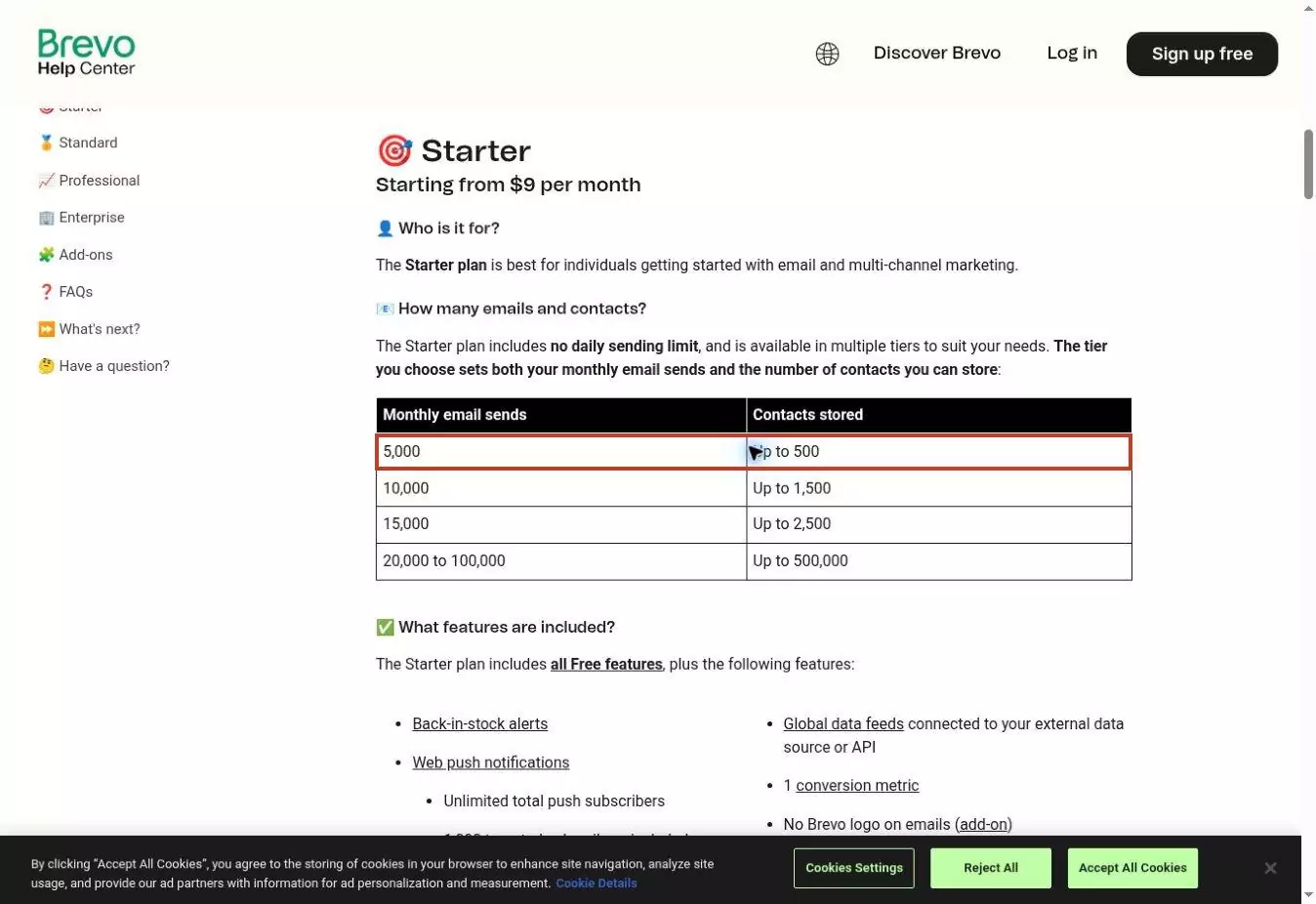
There’s a wrinkle in the pricing table. The Starter tier with 5,000 monthly emails stores up to 500 contacts. The 10,000-email tier stores up to 1,500. A museum with 1,200 subscribers and one monthly mailing therefore needs at least the second of those tiers, even though the smaller one has ample sending capacity. Brevo also lists logo removal as an add-on on Starter. For an organization sending sponsor-branded newsletters, that belongs in the quote.
3. Omnisend for an online store building its first email workflows
A store moving beyond a weekly discount email needs a manageable first project. Omnisend includes prebuilt ecommerce workflows, signup forms and segmentation on its Free plan. That gives a retailer a way to try one sequence with a small audience before committing to a larger rollout.
The free allowance is easy to use up. Two campaigns sent to 250 people each consume all 500 monthly emails, leaving no room for automated follow-ups that month. Write out the condition that matters most to your store, such as what should happen if someone completes a purchase while waiting for a reminder. Use a test order to see whether the available workflow handles it. If the real project involves several customer behaviors and tailored audiences, put Klaviyo on the same shortlist.
4. Klaviyo for retailers whose buying data changes the next message
A customer who bought a coffee grinder yesterday might welcome a cleaning guide. Sending them another grinder discount wastes an opportunity. Klaviyo brings campaigns, automated flows and segmentation into the same platform. It deserves a look when someone on the team can specify which order or customer activity should change the next message, then check that the store supplies that information reliably.
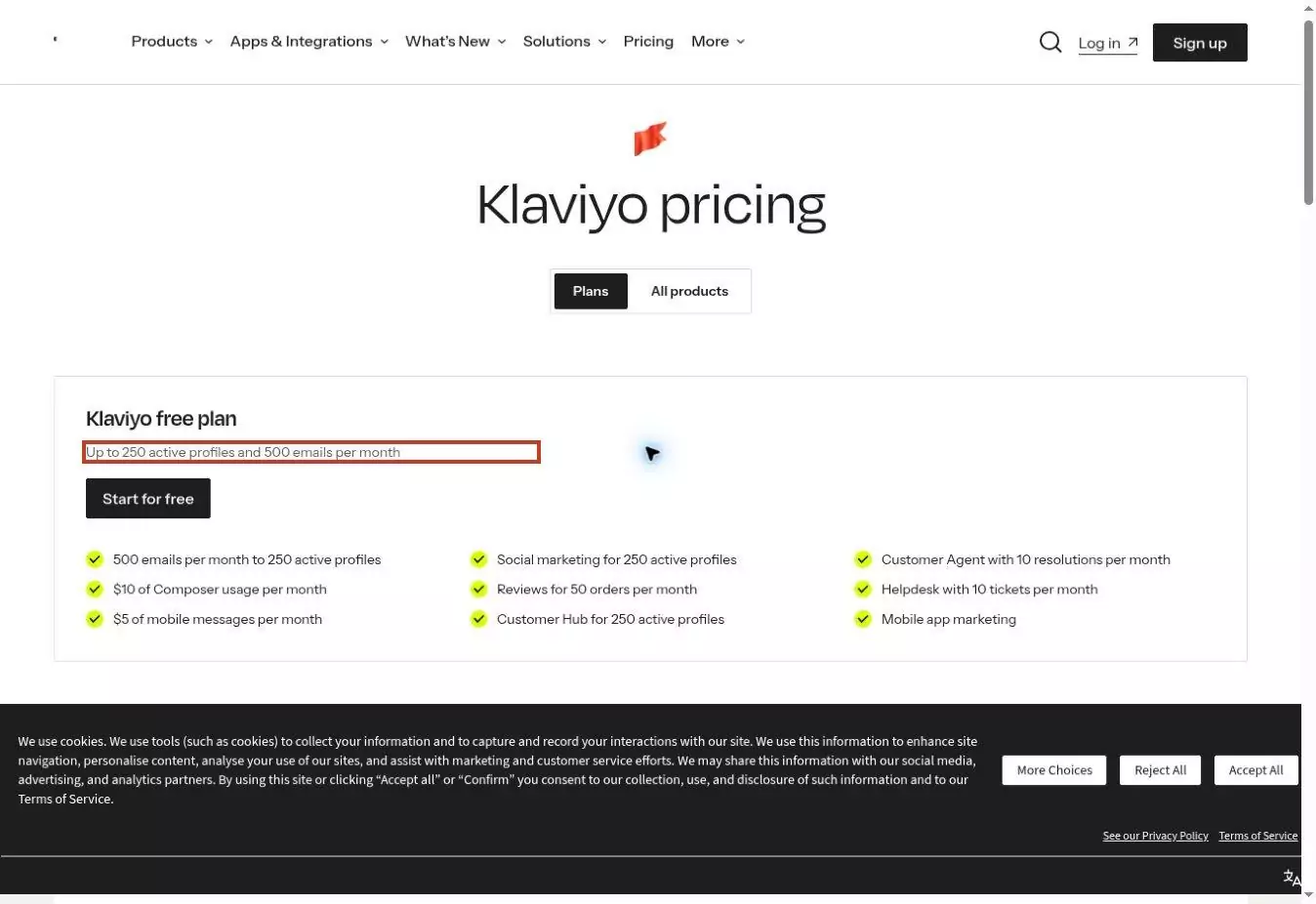
Klaviyo’s US pricing view showed an Email plan at $20 per month for 500 active profiles and 5,000 monthly emails. It defines an active profile as a contact you can market to. Its Free plan allowed 250 active profiles and 500 emails a month. Count both the people you can reach and the follow-ups they generate. For a store that sends everyone the same Saturday offer and has no plans to change that, the effort of mapping customer activity has little immediate return.
5. Kit for creators with a course or product to sell
Imagine an illustrator who offers a free brush pack and teaches a paid lettering class. The people who joined for brushes have already signaled an interest. Kit’s Creator plan includes automated email sequences and a visual builder with split paths. The illustrator can plan a short series around that signup, then direct interested readers toward the class. The point of switching is the ability to give two readers different next steps without hand-sorting them before each send.
Kit’s plan comparison puts the full visual automation builder and unlimited automation templates on Creator and Pro. Price the tier that supports the complete sequence you intend to use. If your work consists mainly of publishing a paid weekly edition, beehiiv deserves an earlier look. Its publication and monetization tools answer a different question from how to sell a course over several emails.
6. beehiiv for a newsletter that is itself the business
For a local politics briefing or a trade newsletter, each edition has two destinations: the reader’s inbox and a page a new reader can discover or share. beehiiv includes a newsletter and website across its plans. Its free offering lists unlimited email sends and access to its recommendation network, a useful combination for a publication experimenting with a more frequent schedule.
The decision changes when the business model changes. In the pricing view checked for this guide, beehiiv placed paid subscriptions, ad monetization and automations on its Lite tier. A publisher deciding whether to move should work out how many paid readers would cover the subscription at its actual audience size. Leave speculative ad revenue out of that calculation until there’s a track record. A retailer using its newsletter chiefly to bring past customers back to a store has a stronger case for an ecommerce platform.
7. ActiveCampaign for follow-up that branches
A training company might send a prospect a syllabus, wait for a response, and send a different invitation depending on which course interests them. A consultant who already booked a call should leave the reminder sequence. Once a journey has several decisions like these, the number of steps the platform permits becomes a buying criterion.
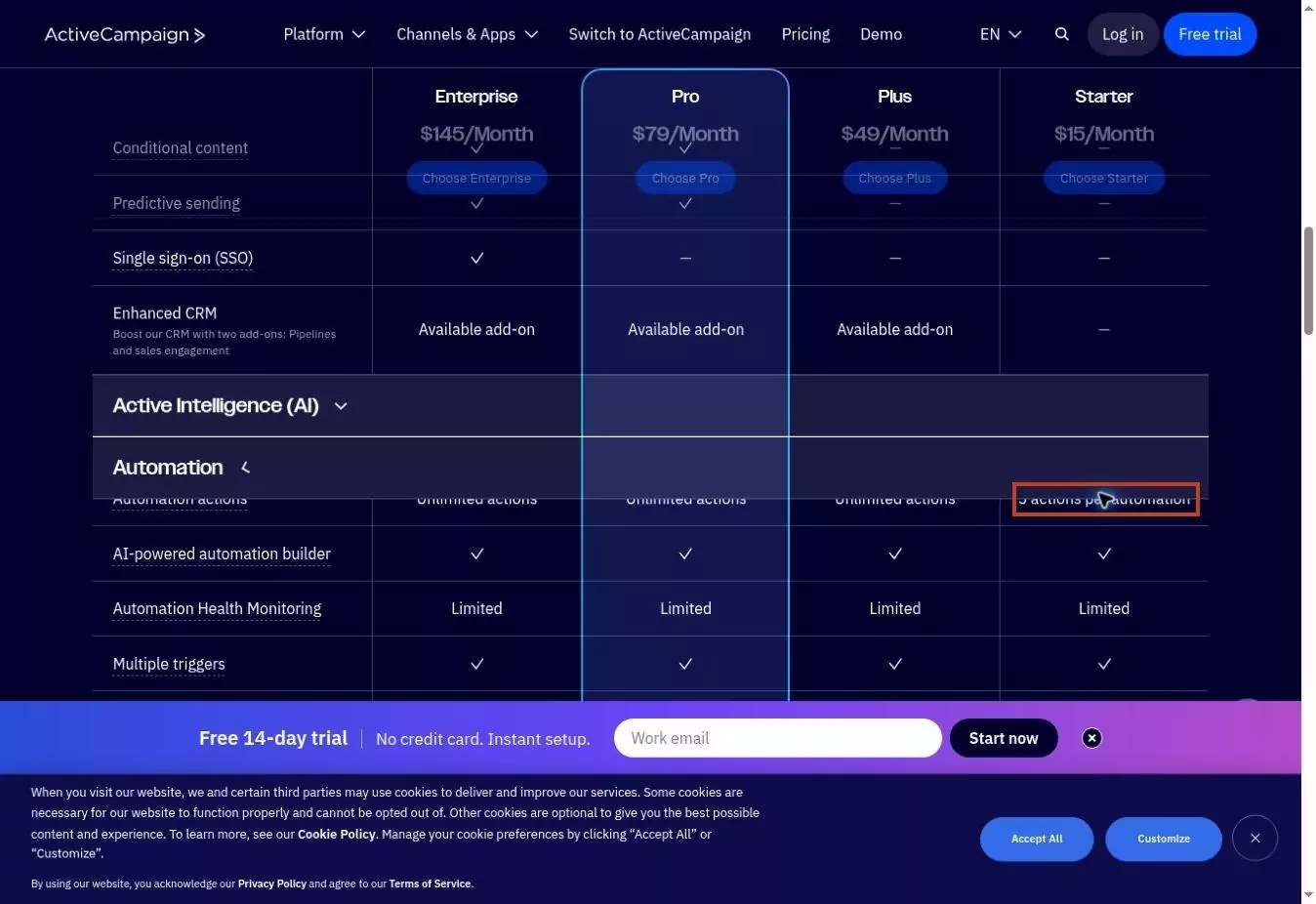
ActiveCampaign’s comparison table gives Starter five actions per automation. Plus, Pro and Enterprise list unlimited actions. Sketch your longest working Mailchimp sequence and count the steps as ActiveCampaign defines them. A five-email series may also need waits or other actions. Splitting it into smaller automations can create extra places to check when a prospect receives the wrong reminder. If sales staff also change contact records, CRM and email platform exchange updates before enabling reminders.
8. GetResponse for webinar-led marketing
When a webinar generates most of your leads, replacing Mailchimp may also be a chance to retire a separate event subscription. GetResponse combines signup pages, email and live webinars on its Creator plan. Its comparison table lists room for 100 attendees and three hours of recording storage on that tier. Those numbers matter more to an instructor than the number of email templates.
Take attendance from your last three events. If 75 people usually turn up from 250 registrations, the 100-attendee room may suit a normal session. If a partner event regularly brings 140 people into the room, Creator leaves a capacity problem on the most important day. In that case, compare the higher-capacity option against keeping your existing webinar service and moving only the email program. Include rehearsal and recording work in the decision.
9. AWeber for publishers turning an RSS feed into email
A trade association already publishing notices on its website can use AWeber’s RSS-to-email feature to distribute new material. That saves editors from copying a headline, summary and link from the website into a second system. Before moving, try a post with a long headline and another with no featured image. A feed-driven newsletter earns its keep only if the routine cases can go out with little intervention.
AWeber’s published Plus pricing table lists $90 billed monthly or $900 billed annually for 5,000 subscribers and 60,000 sends per month. The annual arrangement works out to $75 per month before taxes. That’s a useful reference for a frequent sender. For a trade group mailing four times a month to all 5,000 subscribers, regular editions account for only 20,000 sends. The value of Plus then depends on the other features the group will use and the time its editors save.
10. Campaign Monitor for teams with a custom email design
Some newsletters have strict layout requirements, such as a funder acknowledgment in a fixed position, recurring department headings, or a sponsor block sold for a particular issue. Campaign Monitor lists custom-coded templates, drip campaigns and signup forms on Lite. It makes sense to shortlist it when the first migration question from the design team is whether the existing newsletter can survive the move.
Bring the most awkward issue to the trial. Put a two-line headline beside a short one, replace a landscape image with a portrait and inspect the result on a phone. Then price the publishing schedule. Lite lists a monthly allowance of five emails per subscriber. At 5,000 subscribers, five full-list editions would use all 25,000 sends. A weekly publication can have five issue dates in a month before it sends a single welcome or correction email.
What 5,000 subscribers actually cost you in sends
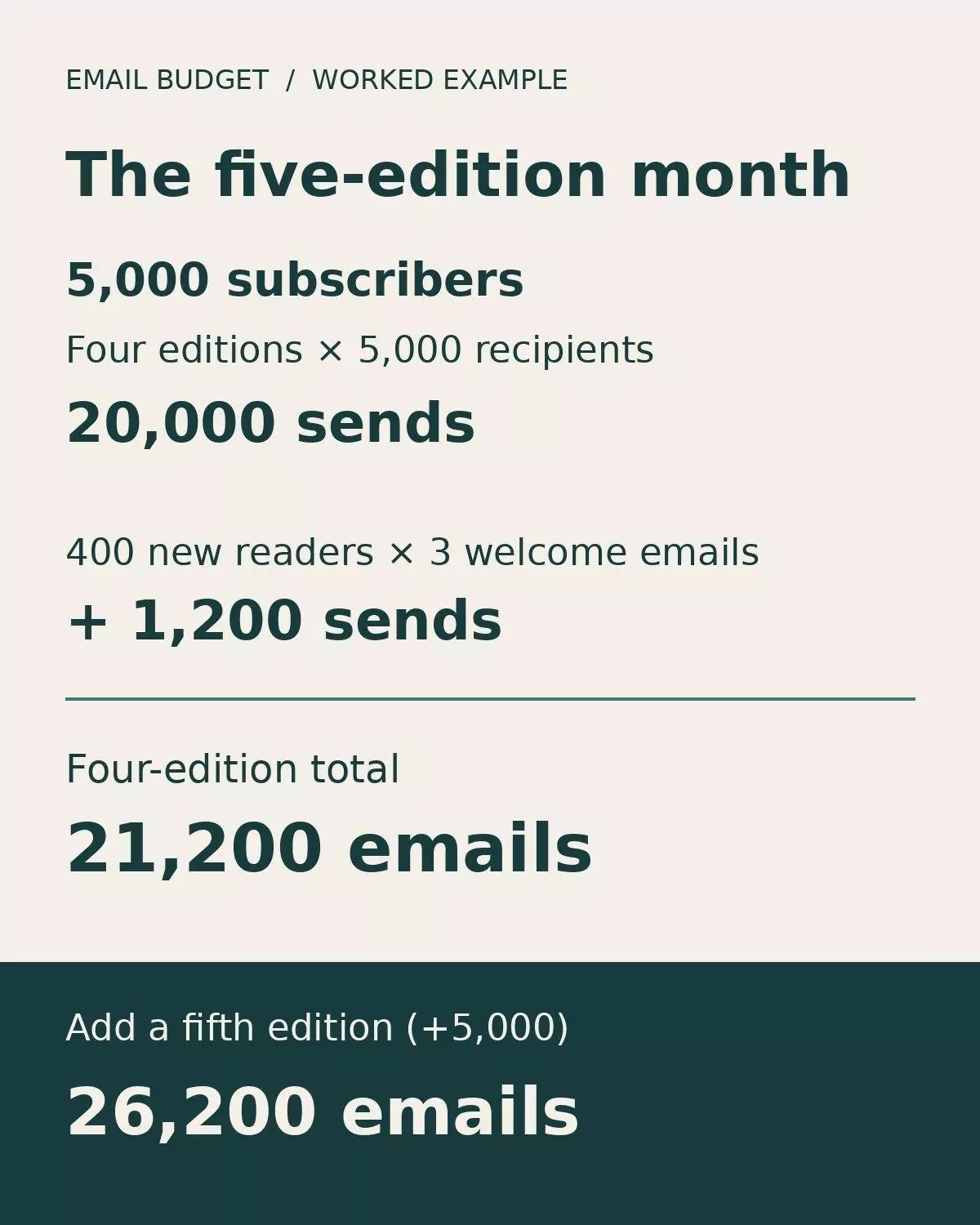
Suppose you have 5,000 marketable subscribers. Four full-list editions require 20,000 sends. Add 400 new readers who each receive three welcome emails during that month and you need another 1,200, for a total of 21,200. This example assumes the 5,000-person audience already includes those readers at each broadcast. It excludes tests, resends, SMS and transactional messages.
Now add a fifth edition. The total becomes 26,200. At Campaign Monitor Lite’s five-times multiplier, the same list that fit comfortably in a four-issue month exceeds its 25,000-send allowance by 1,200. AWeber Plus’s documented 60,000-send allowance at that list size covers both scenarios. That establishes a capacity difference. To judge value, compare actual quotes for the features and commitment you need.
What to take with you when you leave Mailchimp
Export the audience with its statuses intact. Mailchimp can export subscribed, non-subscribed, unsubscribed and cleaned contacts. Keep those groups distinct. Map suppressions before importing eligible subscribers as marketable. The FTC’s guide to opt-outs in commercial email explains why an unsubscribe has to carry over.
Choose one journey to rebuild. Write down its trigger, wait periods, exclusions and exit condition. Use test addresses to walk through a signup, an unsubscribe and, where relevant, a purchase during the waiting period. Check who receives the next message and who stops.
Move the signup points deliberately. Inventory website forms, checkout opt-ins, QR codes and old landing pages. Submit each active form after the switch. A working newsletter template won’t reveal that the form in your website footer still adds readers to the old account. Before the first live send, have the domain administrator check the new sender’s SPF, DKIM and DMARC setup against the FTC’s email authentication guidance.
Keep comparable records. Export campaign reports and templates while the account is accessible. Save the definition behind the metric you report to your team. Route one campaign through the replacement, confirm the recipient count and replies, then retire its old automation so it cannot send a duplicate.
The best Mailchimp alternatives for 2027 earn their place on a shortlist by solving a problem you can name. For a weekly publication, rebuild an actual issue. For a store, run a purchase through the reminder sequence. For a team switching on cost, price the five-edition month. If your current plan handles that work and the expected savings won’t cover the move, renewing Mailchimp is a reasonable decision too.