

Zapier vs Make vs n8n is a decision about who will build, operate and repair your business automations. Start with Zapier when a nontechnical owner needs straightforward app-to-app workflows, Make when the process needs visible branching and data manipulation, and n8n when a technical team needs more control over implementation or hosting. Those are starting points for evaluation, not universal winners: the exact app actions, usage model and maintenance burden can change the result.
A tool that is easy to demonstrate can still be difficult to hand over. A low subscription price can also hide hours spent investigating missing records or maintaining infrastructure. Compare the complete process your team will own, including exceptions, rather than counting integrations or choosing the largest free allowance.
This is a documentation-based comparison checked on November 21, 2026, using current vendor pricing and help material. The workflow, cost worksheet and evaluation exercises below are illustrative planning aids. They are not hands-on benchmark results or accounts of customer implementations.
1. Zapier vs Make vs n8n at a glance
| Decision | Zapier | Make | n8n |
|---|---|---|---|
| Initial fit to evaluate | Business users connecting established apps | Operators who need to see branching and data movement | Technical builders working with APIs, code or hosting requirements |
| Main paid usage lens | Tasks: successful billable actions | Credits: consumption depends on module and feature | Workflow executions on paid plans |
| Hosting choice | Managed service | Managed service | Cloud or self-hosted options |
| Question before choosing | Does the integration expose the exact action you need? | What happens to each item through branches and iterations? | Who maintains the implementation and, if applicable, the server? |
The fit judgments are an editorial analysis of the documented operating models. They do not establish that one product is faster, safer or easier for every person. A technically simple workflow with a poor connector can require more work than a visually complex workflow with the right native actions.
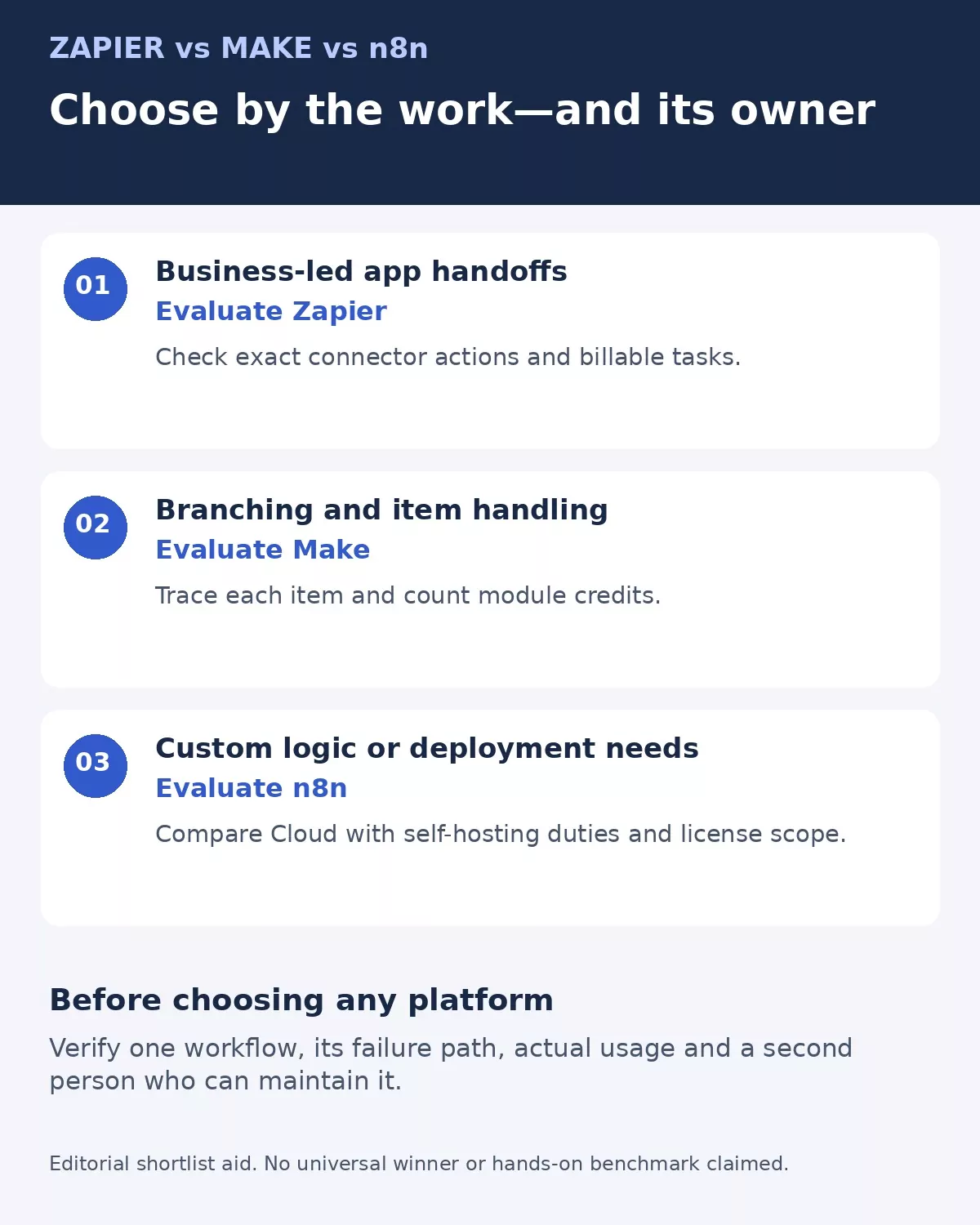
Use the three routes to choose an evaluation starting point, then verify the actual connector actions, usage and recovery path. The diagram is a decision aid rather than a product ranking.
2. Define one real workflow before comparing platforms
Write the trigger, required information, final outcome and failure owner in plain language. For example, when a qualified inquiry arrives, find the existing company record, create or update the contact, assign an owner and notify that person. If no owner can be selected, send the item to a review queue instead of silently dropping it.
Keep a stable inquiry identifier through the process. Decide whether a second notification should update the same contact or create another one. That requirement belongs in the design before anyone chooses the platform.
Our guide to mapping a manual business process before automation gives you a starting point for defining those handoffs. A software comparison becomes more useful once each candidate must satisfy the same outcome.
Then inspect the exact trigger and actions for your apps. A connector listing does not prove that it supports your required custom field, attachment, search filter or account edition. Record each requirement as supported, unsupported or still unverified; do not treat a familiar app logo as a completed integration review.
3. When Zapier is the practical starting point
Zapier organizes automation around Zaps. Its Professional plan includes multi-step workflows, premium app access and webhooks; the Free plan is limited to two-step Zaps and 100 tasks per month. For a business user moving records between established services, that gives a relatively direct way to frame the work as a trigger followed by actions.
Consider the inquiry example. An administrator could evaluate a sequence that receives the inquiry, searches the CRM, updates the appropriate record and sends an internal notification. The useful question is whether the person responsible can inspect the mappings and recognize a bad result without relying on the original builder.
Task accounting deserves attention as the workflow grows. Zapier’s help material counts successful action steps as tasks, while triggers, filters and certain built-in tools do not count. Do not estimate usage by counting incoming inquiries alone or by assuming every visible step has the same billing treatment.
Shared ownership can also change the plan you need. The team offering lists shared Zaps, folders and app connections. An individual plan that can execute a workflow is not automatically the right arrangement for a team that must maintain it when an employee leaves.
Zapier is a sensible first candidate when implementation clarity matters more than infrastructure control. Its meaningful limitation in this comparison is that managed convenience does not remove connector restrictions, third-party API limits or a growing task bill. A missing action can still require a webhook or a different design.
4. When Make’s visual scenarios help
Make’s scenarios expose the connections between modules, with routers and filters available even on the Free plan. That model is worth evaluating when one input needs to take different routes or produce several downstream records.
Imagine a supplier form with several requested services. One request may need a finance review, another an operations assignment, while an incomplete request should stop for clarification. A visible route can make that distinction easier to discuss with the business owner, provided the builder explains the data carried by each item.
The important maintenance question is what happens when one input becomes many items. A search can return multiple records; an iteration can multiply downstream work. Review a small sample with known expected outputs before scaling up. A diagram that looks orderly can still send the same notification several times if its item handling is wrong.
Make now bills in credits. Its documentation distinguishes fixed usage from dynamic consumption: many ordinary operations use one credit, while some AI and advanced features vary with tokens or other usage factors. A router is not a license to assume that everything after it is free.
The Free plan lists 1,000 monthly credits and a 15-minute minimum interval for scheduled runs. Core adds unlimited active scenarios and scheduling down to the minute. Those are scheduling characteristics, not a guarantee that every app event arrives instantly.
Make is particularly worth shortlisting when the operator benefits from inspecting routes and transformations. Its limitation is the attention required to understand item flow and credit consumption. The business needs someone who can explain why a module ran once, ten times or not at all.
5. When n8n’s control is worth the responsibility
n8n offers a hosted service and self-hosted editions. Its current pricing page includes code steps, custom API requests and webhook triggers, while paid pricing is organized around workflow executions rather than a separate charge for every step.
For a technical team, that can suit a process that must call an internal service, transform a response and apply business-specific logic before writing to a CRM. The advantage is flexibility in how the workflow is implemented. The tradeoff is that flexibility needs an owner who understands the implementation.
Cloud and self-hosting should be evaluated separately. A hosted subscription avoids taking on the platform server itself. Self-hosting gives you a deployment choice but adds infrastructure, update, monitoring, backup and recovery work. Assign those duties explicitly rather than placing them under a vague “IT will handle it” assumption.
The Community edition is free software to run under n8n’s Sustainable Use License; it is not unrestricted permission to commercialize every hosting model. Current licensing guidance distinguishes internal workflow creation from letting outsiders build or configure workflows. Client-facing automation products, white-labeling, and licensed features need a separate license assessment. Do not describe the Community edition as equivalent to every paid edition.
For an internal small-business workflow, a technical builder may prefer n8n when custom logic or deployment requirements justify the maintenance. For a company with no one able to restore a failed server, self-hosting is a poor default even if the software fee is zero. n8n Cloud remains a distinct option to compare.
6. Compare current prices without confusing the billing units
The following public entry prices were checked on November 21, 2026. Annual billing means an annual commitment, even when the page expresses the amount per month. US-dollar and euro prices are left in their displayed currencies; these are not exchange-rate equivalents or total implementation costs.
| Paid entry option | Displayed annual-billing entry price | What to model |
|---|---|---|
| Zapier Professional | From US$19.99 per month | Selected task tier, applicable actions and required collaboration features |
| Make Core | US$9 per month at 10,000 monthly credits | Actual module consumption, item counts and any dynamic usage |
| n8n Cloud Starter | €20 per month, 2,500 executions with unlimited steps | Execution allowance, concurrency and project requirements |
These prices describe the displayed entry configurations, not a quote for your workflow. App subscriptions, third-party API or AI usage, taxes and implementation labor can add costs. A higher tier may be needed for the way the team shares or governs the automation.
Use a worksheet instead of comparing 1,000 with 1,000
Suppose an illustrative process handles 600 inquiries monthly. If its design uses three billable successful actions per inquiry, the simplified task estimate is 600 × 3 = 1,800 actions. If a different design consumes six fixed credits per inquiry, the simplified estimate is 600 × 6 = 3,600 credits. If each inquiry starts one counted workflow execution, the simplified estimate is 600 executions.
Those are assumed counting models, not measurements of an implemented Zap, scenario or n8n workflow. Retries, searches, branching, polling, sub-workflows and dynamic features can alter consumption. The point is to count the billable unit after designing the process, not to declare that one platform is three or six times cheaper.
Include staff time. As a separate hypothetical example, two maintenance hours valued internally at $40 per hour add $80 to monthly operating cost. That assumed labor value can outweigh a small subscription difference. It is not a vendor charge or a measured productivity result.
7. Require a recovery and security plan
Use a stable record key to check whether a destination action already succeeded before replaying a failed workflow. Define which failures can be retried and which need human review. A rejected field value should not be retried forever; a temporary service error should not cause the same customer record to be created twice.
Keep an exception queue with the source record, failed step, last confirmed result and next owner. Our workflow automation error guide explains how to distinguish repair from unsafe repetition.
Connect only the data and permissions needed for the workflow. The FTC’s security guidance for businesses emphasizes deliberate collection, access and retention decisions. Apply that to execution logs as well as the source apps: a convenient debugging record can contain customer information.
Protect administrative accounts with appropriate multifactor authentication. NIST’s small-business MFA guidance explains why an additional factor helps when a password is compromised. That does not establish that every vendor plan offers the same enforcement or sign-on controls; assess those features separately.
8. Make the decision with five acceptance checks
Give each shortlisted platform the same small, authorized evaluation exercise. Use synthetic records where possible, and define the expected result before running anything. A successful demonstration should produce evidence that another person can interpret.
- Process a valid record and confirm the destination fields.
- Send the same event twice and check whether it creates a duplicate.
- Supply a missing required field and verify the review path.
- Simulate an unavailable destination in an appropriate test environment and inspect recovery behavior.
- Have a second authorized person explain the workflow and locate the failure record.
Record observed usage, time spent fixing problems and which plan features were needed. These are proposed tests for your team; no execution or results are claimed here. Do not use a production customer message or payment as a casual demonstration.
Choose the simplest candidate that passes the requirements and has a credible maintenance owner. If none passes, simplify the process or keep a human approval step while the missing capability is resolved.
Choose Zapier vs Make vs n8n around the operating owner
Zapier vs Make vs n8n becomes a clearer choice when you connect capability, usage and responsibility. Evaluate Zapier for accessible app workflows, Make for visible branching and data handling, and n8n for technical control with a deliberate hosting decision. The right answer is the platform your team can explain, recover and afford at its actual workload.
Start with one complete workflow, including its failure path. Compare the resulting billable consumption and ownership requirements, then expand after the process is understandable to more than one person.