

Before you map a manual business process for automation, decide which outcome you want to improve: fewer missed requests, less retyping, faster handoffs or a clearer approval trail. Then follow real work from its starting event to its final result. A useful map shows who acts, what information they need, where work waits and what happens when something goes wrong.
You do not need an expensive modeling platform to start. A shared document, spreadsheet or whiteboard can capture the first version. The important distinction is between a map of what people actually do and a diagram of what the policy says they should do. Automating the second while ignoring the first leaves the workarounds intact.
This guide offers a research-based method for small-business operators. The service-request example, calculations and proposed tests below are illustrative; they are not results from a company trial.
1. Define the boundaries before drawing boxes
Choose one repeatable process with a recognizable beginning and end. “Improve customer service” is too broad. “Receive a service request, check its details, assign an owner and confirm an appointment” is specific enough to investigate.
Write down the trigger, final output, customer, process owner and exclusions. For the example here, the trigger is a submitted service request and the output is a confirmed appointment or a recorded reason the request could not proceed. Completing the service and collecting payment are separate processes. That boundary prevents the mapping session from expanding into a redesign of the whole business.
Also define what counts as one case. An email thread containing three separate requests is not necessarily one unit of work. Give each case a stable reference so the team can follow it across inboxes, forms and calendars.
2. Choose a map that answers your question
| Format | Use it when | What it leaves out |
|---|---|---|
| Simple flowchart | You need to understand task order and decision branches. | Responsibility and waiting time need extra labels. |
| Swimlane map | Work passes between people, teams or systems. | A lane does not explain the exact permission or approval rule. |
| Value-stream view | You need to compare processing time with delays across a complete flow. | Detailed field validation and exception handling need a supporting record. |
| Step register | The person building the automation needs inputs, outputs and rules for each action. | A table alone can make loops and alternative routes harder to see. |
For a small team, a simple flowchart plus a step register is often enough. Add swimlanes when ownership is unclear. Keep the diagram readable and put detailed field rules in the register instead of squeezing them into tiny boxes.
The AHRQ flowchart guide describes a method for visualizing process steps. Its setting is healthcare, but the basic diagramming technique is useful beyond that setting; it is not a business automation performance guarantee.
3. Map a manual business process from actual cases
Ask the people doing the work to walk through recent cases. Include a straightforward case and examples with missing information, a correction or a delay. Select records you are authorized to inspect and redact unnecessary customer details before sharing the map.
For each action, ask what arrives, where it arrives, who notices it and how that person knows it is ready. Then ask what they create or change and who receives the result. Watch for steps that happen outside the main system: a phone call, a personal spreadsheet, a forwarded message or a reminder someone keeps in their head.
Use verbs with visible outcomes. “Handle request” conceals several actions. “Check service address,” “confirm service coverage” and “assign scheduling owner” reveal the decisions an automation would need to support. Mark disagreements as unresolved rather than forcing participants to accept a tidy but inaccurate flow.
A practical step register
| Field | What to record | Example |
|---|---|---|
| Trigger and input | The event and minimum data needed to begin. | Form submitted with request ID, address and service type. |
| Owner and system | The responsible role and actual working location. | Coordinator reviews the shared request queue. |
| Decision rule | An observable condition, plus who resolves uncertainty. | Missing service address routes to clarification. |
| Output and recipient | The record or state produced and its next owner. | Validated request enters the scheduling queue. |
| Timing and exceptions | Time spent working, time waiting and alternate routes. | Awaiting customer reply; coordinator owns follow-up. |
| Evidence of completion | How someone can verify the step really finished. | Appointment reference and confirmation recorded. |
4. Draw the exceptions, not just the successful route
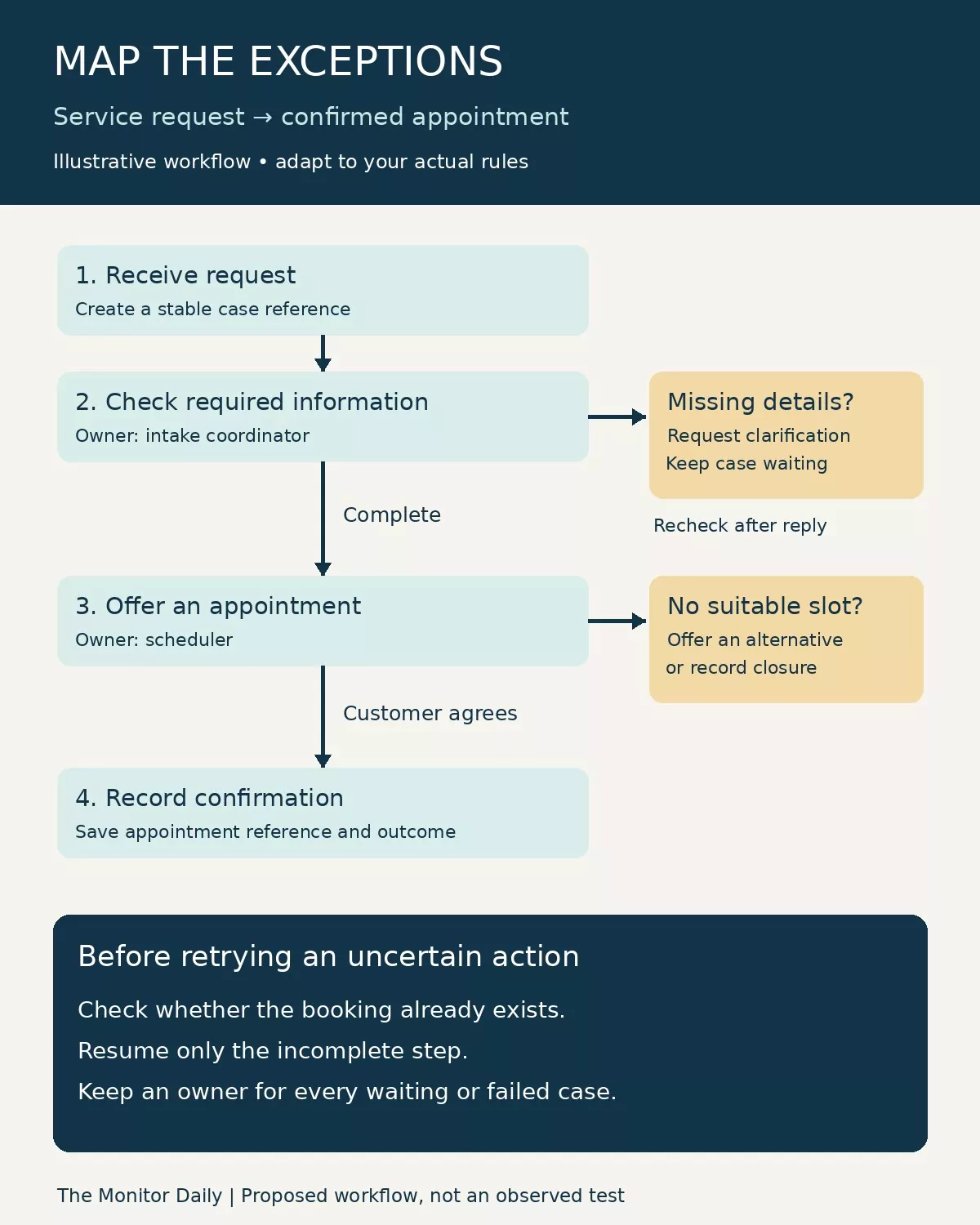
In the fictional service business, a request arrives, the coordinator checks the information, a scheduler offers an appointment and the customer confirms it. That is only the normal route. Missing details must go back for clarification. An unavailable appointment needs another offer. An out-of-area request needs an explicit decline or referral decision.
A branch should end in an identifiable state with an owner. “Error” is not a useful destination if no one sees it. Record whether the case is waiting, rejected, canceled or ready to resume. When a corrected request returns, identify the point it rejoins the process so already completed work is not repeated unnecessarily.
Include duplicate submissions, customer cancellation and uncertain outcomes. If the calendar accepts an appointment but the confirmation step times out, the team must check whether the booking exists before trying again. Our guide to handling errors in workflow automation explains how to reconcile an uncertain result before replaying an action.
5. Separate hands-on work from waiting time
A task that takes five minutes to perform can spend a day waiting in an inbox. Record those two quantities separately. Use observed timestamps where available; label staff estimates as estimates. Agree whether elapsed time means business hours or continuous clock time before comparing cases.
Consider an illustrative request requiring 4 minutes of intake work, 6 minutes of validation and 5 minutes of scheduling. Hands-on work totals 15 minutes. If it also waits 120 minutes for review and 180 minutes for the customer’s reply, elapsed time is 315 minutes, assuming these intervals are sequential and use the same clock. Removing two minutes of typing does little to address the five hours of waiting.
The lesson is to locate the delay before selecting the tool. A clearer intake form might prevent clarification, while better queue visibility might reduce internal waiting. A customer’s response time may remain outside the company’s direct control.
NIST’s value-stream mapping guidance, written for manufacturing, separates current-state mapping from diagnosing problems and designing a future state. For this office-work example, that distinction helps keep observations separate from proposed improvements.
6. Decide what to remove, improve or automate
Do not assume every existing step deserves software. First establish why the step exists. An approval may protect a real business risk; a second copy of the same information may simply be an old workaround. Removing either without understanding its purpose can create a different problem.
| Finding | Practical response | Before proceeding |
|---|---|---|
| Two records duplicate the same data. | Choose an authoritative record and reduce re-entry. | Confirm who relies on each copy and preserve necessary history. |
| Staff disagree about a decision. | Clarify the business rule and its exception owner. | Obtain approval from the responsible process owner. |
| A stable rule routes complete requests. | Consider automating classification or assignment. | Test incomplete, duplicate and unusual inputs. |
| A step involves negotiation or ambiguous judgment. | Keep accountable human review; automate preparation where useful. | Define what information the reviewer receives. |
| A task is rare and changes frequently. | Compare a simple manual procedure with automation upkeep. | Include setup, monitoring and maintenance effort. |
Record the proposed future state separately from the current map. For each change, state the problem, intended benefit, owner and validation method. “Reduce duplicate scheduling” is testable. “Make the process smarter” is not.
7. Turn the map into a small, testable pilot
Start with a bounded activity such as validating required fields or assigning a request to a queue. Avoid giving an initial pilot authority to send unrestricted messages, commit spending or change sensitive records. Use a suitable test environment or controlled records, with access approved by the business.
Specify the acceptance tests before building. A complete request should reach the correct owner once. An incomplete request should remain visible with a reason. Submitting the same case twice should not produce two appointments. A canceled case should not continue through later scheduling steps. A simulated outage should leave enough information for someone to recover safely.
These are proposed tests, not tests performed for this article. Log the input, expected result, actual result and evidence. A green execution indicator alone does not prove that the right appointment or message was created. Inspect the destination and compare it with the original request.
Give the pilot an owner, a stop condition and a manual fallback. Review the exception queue during the pilot rather than waiting for a customer to report a problem. Expand only after the team understands both successful and failed cases.
Keep the map useful after launch
Put the process owner, version date and change history alongside the map. Review it when a form field, approval rule, integration or team responsibility changes. Link each automation step to its corresponding business step so a future maintainer can understand why it exists.
To map a manual business process well, finish with more than a diagram: retain a validated current-state map, a step register, a proposed future state and a short test plan. Those records help the team decide what should be automated, what should stay under human control and what should be removed before any new software is introduced.