

CRM tags vs custom fields is a design decision about how your team will use information. Tags are useful labels for grouping records and marking context; custom fields give a defined attribute a value, such as renewal date, account owner or company size. Choose the structure that makes the next action clear, and avoid keeping two conflicting versions of the same fact.
A small team can work with a surprisingly modest data model. Problems usually begin when “urgent,” “hot lead” and “priority” acquire different meanings, or when a critical date is buried inside a label that nobody can reliably sort. Adding more labels does not repair an unclear process.
This is a research-based comparison, checked against current CRM documentation on November 16, 2026. The examples, schema and test cases below are proposed designs, not observations from a live customer database or claims of hands-on product testing. Exact permissions, field types, limits and automation behavior depend on your CRM and subscription.
CRM tags vs custom fields: the practical comparison
A tag usually expresses membership in a group: this record has the label or it does not. A field expresses an attribute and its value: this account’s renewal date is February 15, or this opportunity’s expected amount is $8,000. Those distinctions help you choose a model, but they are not universal restrictions on what a CRM can do.
| Decision | Tags often fit | Custom fields often fit |
|---|---|---|
| What question are you answering? | Does this record belong in this group? | What is the value of this defined attribute? |
| Typical example | A temporary campaign cohort or an operational review label | A date, amount, controlled status or named owner |
| Can several apply? | Usually several labels can coexist | Depends on field type; multi-select fields can hold several choices |
| Reporting need | Filter or compare defined groups where supported | Group by a consistent value, calculate or sort using the appropriate type |
| Main governance risk | Duplicate labels, unclear meaning and stale membership | Poor definitions, unsuitable field types and too many required inputs |
| What needs an owner? | Who creates, applies, removes and retires the label | Who defines the field and maintains its authoritative value |
Do not assume that only tags can trigger automation. ActiveCampaign’s documentation says both tags and custom fields can be used in segmentation and automation triggers. Its guidance also distinguishes contact labels from fields whose values can be inserted into messages. That is a product-specific example, not a promise that every CRM has identical features.
1. Use tags for groups with a clear purpose
Tags work well when several independent descriptions can apply at once and a team needs a convenient way to retrieve the records. A contact might be in a webinar follow-up cohort and a customer-advisory group at the same time. Neither label has to replace the other.
For a temporary operational queue, a label such as “review:missing-company” can make unfinished work visible. Define the exit condition when you create it: remove the label after the company association has been checked, rather than leaving a permanent mark that no longer reflects the record.
Campaign labels need equally clear definitions. “campaign:nov-webinar-followup” might mean a person was selected for a particular follow-up cohort. It should not silently mean registered, attended, clicked and consented to future marketing all at once. Those are different events or permissions.
Tags become unreliable when their meaning depends on who remembers applying them. If “VIP” changes routing, specify the qualification rule, the person responsible and what happens when the qualification ends. If nobody can define the consequence of a tag, first ask whether the tag is needed at all.
Names should reveal the purpose, not hide personal data
A simple naming convention can make a small tag library easier to read. Prefixes such as “campaign:”, “interest:” and “review:” distinguish three different uses without requiring a separate account field for each short-lived group.
Treat these prefixes as your team’s convention; they do not create special CRM behavior. Check whether punctuation and capitalization are handled consistently by the interface, imports and integrations. Avoid putting email addresses, confidential notes or sensitive personal characteristics into label names.
2. Use fields when the value must be dependable
Choose a field when users need to read, replace, validate, sort or report on an attribute consistently. A renewal date should behave like a date. A deal amount should support the intended currency and reporting rules. A customer status should use agreed choices rather than dozens of loosely equivalent labels.
Start by checking for an appropriate built-in field. Creating “Account owner custom” alongside an existing owner field can produce two answers to the same question. Keep the native field when it supports the actual requirement, especially if routing or permissions depend on it.
Then select the appropriate record type. Company size usually describes an account or company; an individual contact’s preferred communication channel describes that contact. An expected closing date belongs to an opportunity. Storing opportunity-specific facts on a contact becomes confusing when one person is involved in several deals.
| Information | Suggested structure | Why |
|---|---|---|
| Current sales stage | Native opportunity stage, where suitable | One governed current state for the opportunity |
| Next renewal date | Date field on the appropriate account, contract or subscription record | Supports date-based work without parsing label text |
| Company size | Numeric field or controlled size band | Use a number for calculations, or a band when that is all the process needs |
| Product interests | Controlled multi-select field when interests are a maintained attribute | Several known values can coexist without becoming unrelated labels |
| Temporary cleanup queue | Tag or supported task/list mechanism | Membership can end when the work is finished |
| Repeated webinar attendance | Event/activity records or an appropriate related object, where supported | Preserves individual events instead of overwriting the last date |
Custom fields are not inherently permanent. A current status may change every week. The important point is that the field continues to ask the same question while its answer changes. Conversely, a tag may remain useful for years if a historical cohort has a legitimate, well-defined purpose.
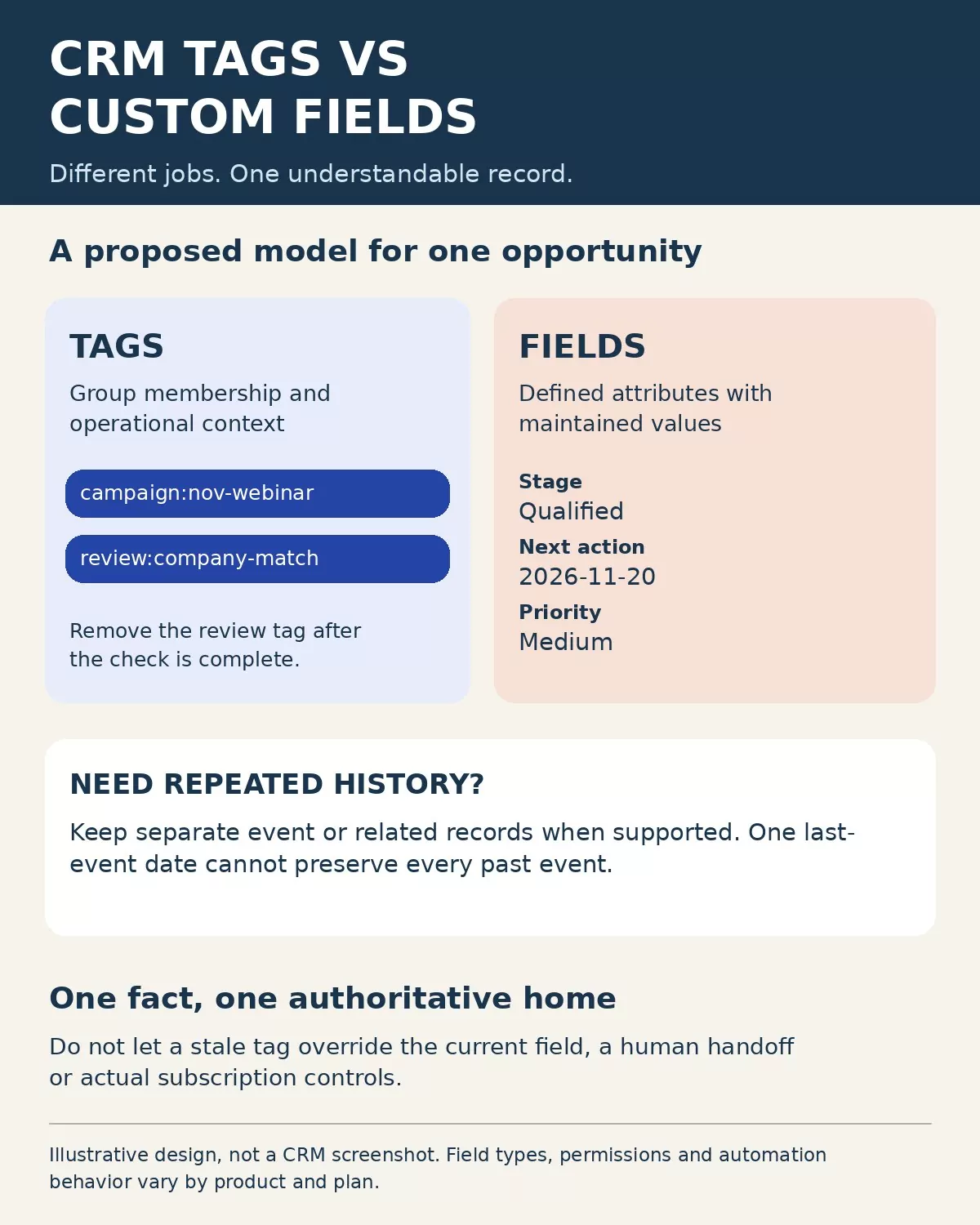
3. Give each fact one authoritative home
Consider a hypothetical prospect with the tags “hot,” “warm” and “priority-high,” plus a Priority field set to Medium. A sales rep cannot tell which instruction wins. The database has collected several opinions without a rule for resolving them.
A better proposed design is a controlled Priority field with High, Medium and Low values, maintained by a defined process. A separate review tag can flag a record whose priority needs checking. The tag identifies work to do; it does not supply a competing priority value.
The same principle applies to lifecycle status. Do not make a “customer” tag and a Customer status field independent authorities. If a downstream integration requires a tag, derive it from the authoritative field through an explicit mapping and reconciliation process. Record which direction updates are allowed to travel.
There is no need to eliminate every duplicate representation. A display label or synchronized field may be useful. What matters is knowing the source of truth, the update rule and the response when the two disagree.
Missing is different from no
A blank field might mean nobody has collected the answer. A value of No might mean the question was answered negatively. Those states should not automatically drive the same workflow.
For example, a blank renewal date should enter a review path rather than be treated as “never renews.” Define required information at the stage where it becomes necessary, and provide a clear exception route instead of making people enter invented dates to save a record.
4. Connect the model to an actual workflow
For an inbound inquiry, a small team might keep the responsible owner, current status and next-action date in fields, while using a campaign tag to identify a follow-up cohort. A reply changes the workflow state; the historical cohort label can remain if there is a reason to retain it.
Before sending anything, the automation should inspect current eligibility and the authoritative state. A stale “send-followup” tag should not override an opt-out, a booked meeting or a human takeover. Use the platform’s actual subscription and suppression controls; an improvised tag is not proof of permission to contact someone.
Our CRM follow-up workflow guide explains the trigger, stop-condition and exception decisions. For this comparison, the key question is which field or event supplies each decision—not merely which label is easiest to add.
At the point of a marketing to sales handoff, agree on the required information and its owner. A tidy record is only useful when the receiving person can tell what happened and what to do next.
5. Keep a small data dictionary
Before adding a field or an important tag, write its definition in a shared record. The dictionary does not need to be elaborate. It should answer enough questions to stop a future administrator from guessing.
| Dictionary item | Example for a proposed Priority field |
|---|---|
| Purpose and record type | Route an inbound opportunity for review |
| Allowed values | High, Medium, Low; blank means not yet assessed |
| Responsible owner | The role authorized to assess priority |
| Update source | Approved assessment workflow or authorized manual change |
| Downstream use | Routing and the priority report |
| Conflict rule | Send conflicting inputs for review; do not silently replace a verified assessment |
For a tag, add the application rule, removal condition and review or retirement date. A campaign label may be retained for a defined reporting period; a cleanup label should usually end when the cleanup does.
Map where values come from and where they go, including forms, imports and connected applications. The inventory and mapping section of NIST’s Privacy Framework 1.0 provides a broader privacy-risk framework for understanding systems, data elements, purposes and processing relationships. A CRM dictionary is one practical part of that work, not a claim of compliance with the framework.
6. Clean up old tags without breaking the process
Inventory the existing labels and fields before deleting or merging anything. Identify which reports, views, forms, integrations and automations refer to each item. Export an authorized backup where your system supports it, and preserve stable record identifiers for any migration.
Decide what each label means before moving it into a field. A single “hot” tag might have meant budget confirmed to one rep and merely replied to another. Do not convert that ambiguity into a confident High value for every contact. Mark uncertain records for review.
Build a mapping sheet with old label, intended meaning, destination, transformation rule, conflicts and owner. Test a small controlled sample, compare expected results and pause customer-facing actions during risky changes where your system permits.
Zoho’s documentation illustrates why product-specific checking matters: its tagging FAQ describes dependencies that must be removed before deleting a tag used in workflow criteria, reports or views. Check your own system’s behavior rather than assuming that a rename, merge or deletion automatically updates every consumer.
7. Test the rules with fictional records
Use this acceptance checklist before applying the design to real contacts. These are proposed tests, not completed results.
| Test case | Expected behavior to verify |
|---|---|
| Two independent cohort tags | Adding the second label preserves the first when both are intended |
| Priority changes from High to Medium | The current field and dependent routing agree; no contradictory priority label remains authoritative |
| Required information is unknown | The record enters a review path without a fabricated value |
| An integration sends an older value | The documented conflict rule applies and the change is visible for review |
| A customer opts out while waiting | Actual suppression controls prevent the prohibited send regardless of campaign labels |
| A label is retired | Dependent reports and automations have an approved replacement or intentionally stop using it |
Also inspect the export. A field type that looks convenient in the interface may produce multiple columns, IDs or delimited values in another application. Test a round trip with fictional data and document the mapping before promising seamless synchronization.
The FTC’s Start with Security guidance recommends limiting unnecessary personal information, retaining it only for a legitimate need and restricting access appropriately. Apply that thinking to labels and fields as well as attachments. Do not add sensitive information merely because a free-text box allows it.
Choose CRM tags vs custom fields around the decision
The useful answer to CRM tags vs custom fields is usually a combination with clear boundaries. Use tags to identify defined groups and context, fields to maintain dependable attributes, and event or related records when repeated history matters. Give each operational fact an authoritative home, document its owner and test what changes downstream. That makes the data easier to act on without turning the CRM into a collection of competing labels.