

A customer calls about a move-out cleaning. She needs the work done Friday, but she won’t have the keys until her landlord confirms a time. The receptionist writes “Friday cleaning” on the calendar. By Thursday, the crew thinks it has a job, the customer thinks someone will call her, and nobody knows who promised what.
A simple lead tracking process gives that request a place to live before it belongs on the schedule. Keep one shared record per potential job. Give each open request an owner, a specific next action, and a deadline. For the cleaning inquiry, that might read “Maya will call Thursday at 10 a.m. to confirm key pickup.” Now the morning shift knows exactly what to do.
Set up a lead tracker someone else can use
A shared spreadsheet is enough to start if the person answering the phone and the person quoting the job can both update it. Build the first row around a question the next shift will actually ask: “What do we owe this customer?” These fields give them an answer.
| Field | Example entry |
|---|---|
| Request ID and date received | 1042 · Monday, May 4 |
| Contact and preferred channel | Elena · call the number on file before noon |
| Job and constraints | Move-out clean · two bedrooms · keys pending |
| Channel and source | Phone inquiry · referred by landlord |
| Stage and owner | Quote sent · Maya |
| Last contact | Wednesday · Elena received the estimate |
| Next action and deadline | Call Thursday at 10 a.m. to confirm access |
| Outcome or booking reference | Leave blank until the customer decides |
Keep payment details and door codes out of the lead sheet. If a dispatcher only needs a ZIP code to check the service area, collect the full address when someone needs it to prepare an estimate or schedule a visit. The Federal Trade Commission’s guide to protecting customer information explains how to limit the data a business keeps and who can access it.
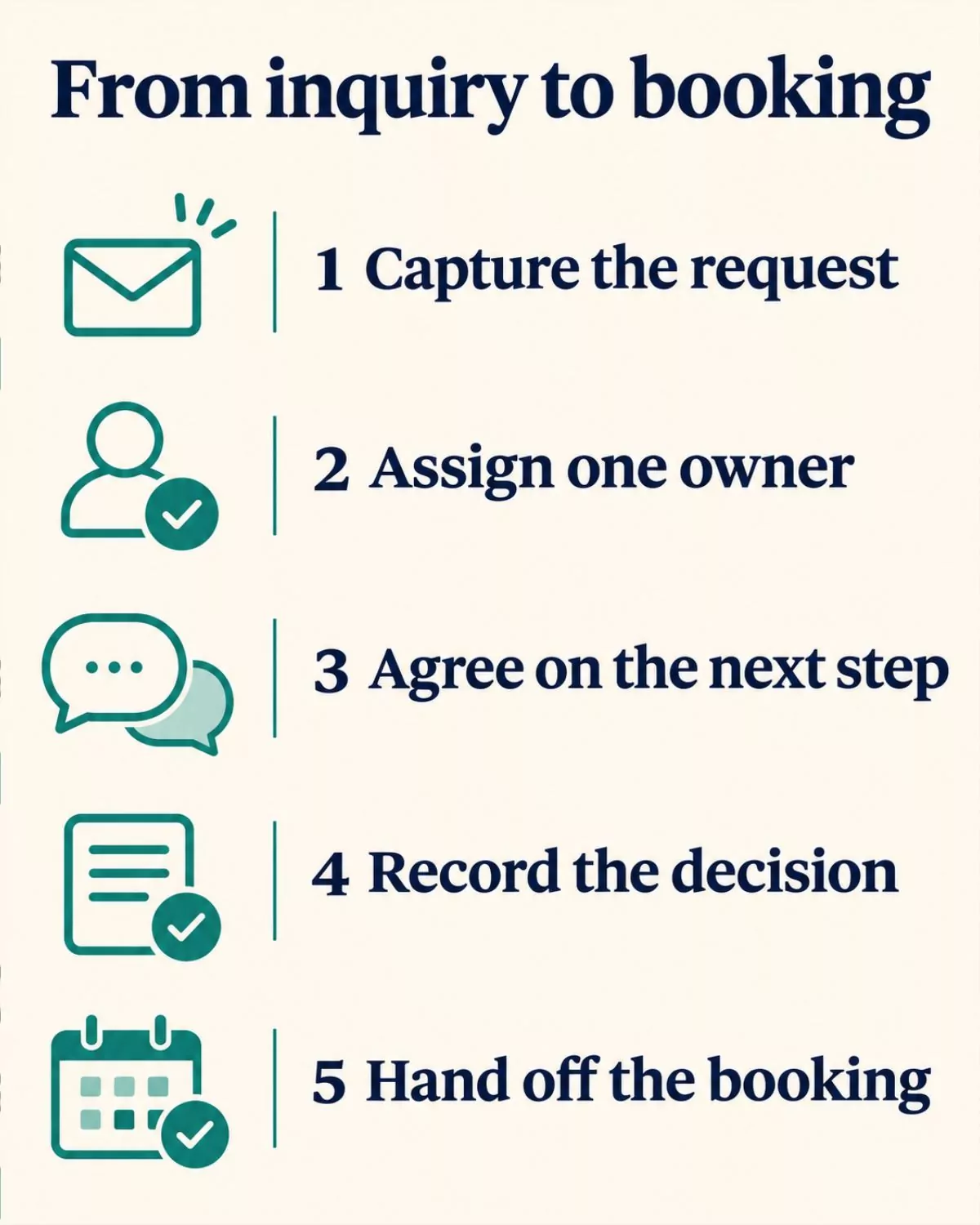
1. Capture calls, forms, and referrals in the same place
Whoever receives the inquiry checks for an existing request before adding a row. A voicemail followed by an online form about the same cleaning gets one record with both contacts noted. A landlord requesting a second clean at another property gets a second record, even if the phone number matches. The unit you are counting is a possible job.
Separate how the inquiry arrived from how the customer found you. “Phone” tells the office which channel to staff. “Landlord referral” tells the owner which relationship brought in the work. If the source is unknown, leave it as unknown. Guessing “website” after every form submission makes the marketing figures harder to interpret.
2. Assign one person to check fit and reply
The owner of the record is responsible for the next customer contact. In a two-person shop, the office manager might own the inquiry while a technician supplies a labor estimate. If responsibility changes, the recipient should acknowledge the handoff before the original owner clears the callback from their list.
Start with the questions that could rule the job in or out. For a cleaning crew, those might be the location, property size, required date, and access window. For a bookkeeper, the important details might be the accounting period, the software involved, and the filing deadline. Rice University’s OpenStax explains how a short conversation can establish fit in its overview of prospecting and qualifying potential customers.
3. Give every open quote a dated next step
“Quote sent” records a milestone. It tells the next person very little about what happens tomorrow. Before ending a conversation, ask when the customer expects to decide and which channel works for a follow-up. If they are waiting on someone else, agree on when to check back.
For Elena, a useful note would read, “Estimate covers both bedrooms. Elena expects the key pickup time Wednesday evening. Maya to call Thursday at 10.” If the reply changes the scope, record the revised quote and which version the customer received. Otherwise, a colleague may book the right date at the wrong price.
At opening time, filter the tracker for overdue actions and actions due today. Before closing, compare missed calls, form submissions, and the shared inbox with the tracker. Look especially for open rows with a blank owner or deadline. Those requests will never appear on anyone’s dated callback list.
4. Record the decision, including when to stop calling
Use a short set of stages the whole team can distinguish: new, in discussion, quote sent, booked, and closed. A customer who asks for a call after a lease signing can stay in discussion with an agreed date. Close anyone who declines immediately. Record the stated reason in a few words, such as “needed Saturday service.” If the customer gives no reason, leave it unknown.
Set a stopping rule for unanswered estimates. For example, a shop might make the agreed callback, send one final message through the customer’s preferred channel, then close the request as “no response” on a specified date. Adapt that rule to the service and honor any request to stop. If the customer returns about the same job, reopen the record so the next conversation starts with the existing quote.
5. Hand confirmed work to the schedule
Define what counts as booked in your business. A cleaning service might require acceptance of the quoted scope and an agreed arrival window. A contractor whose normal booking terms require a deposit would also check that the deposit had been received. Until those conditions are met, distinguish a tentative calendar hold from a confirmed job.
Once Elena confirms the keys and accepts the Friday slot, Maya creates the work order, copies the agreed scope and access window, and adds the work-order number to the lead record. The dispatcher checks that Friday’s crew can see the booking. If scheduling fails halfway through, the reference field shows where to investigate before anyone creates a duplicate appointment.
Read the weekly numbers without losing the open jobs
Start the weekly review with missed commitments. Which estimates went out without a follow-up date? Which customers accepted a quote but still have no work order? Fix those rows while the team can still act. Then look for recurring reasons work was declined, such as a service area mismatch or unavailable weekend appointments.
For booking rate, compare requests received during the same period. Suppose 20 distinct inquiries came in during one week. By the review date, eight were booked, six were closed without a booking, and six remained open. That group’s booking rate so far is 8 ÷ 20, or 40%. Keep the six open requests visible and revisit the same group later. Dividing this week’s bookings by this week’s new inquiries would mix groups if some bookings came from last month’s quotes.
Keep the spreadsheet so staff can find and update the right row during a call. If two people regularly return the same voicemail or reminders depend on one person sorting the sheet, those are concrete requirements to take into a customer relationship management software trial. A practical first test is to give a colleague an open inquiry and ask who owes the customer what, and by when. If the answer is clear, the tracker is doing its job.