
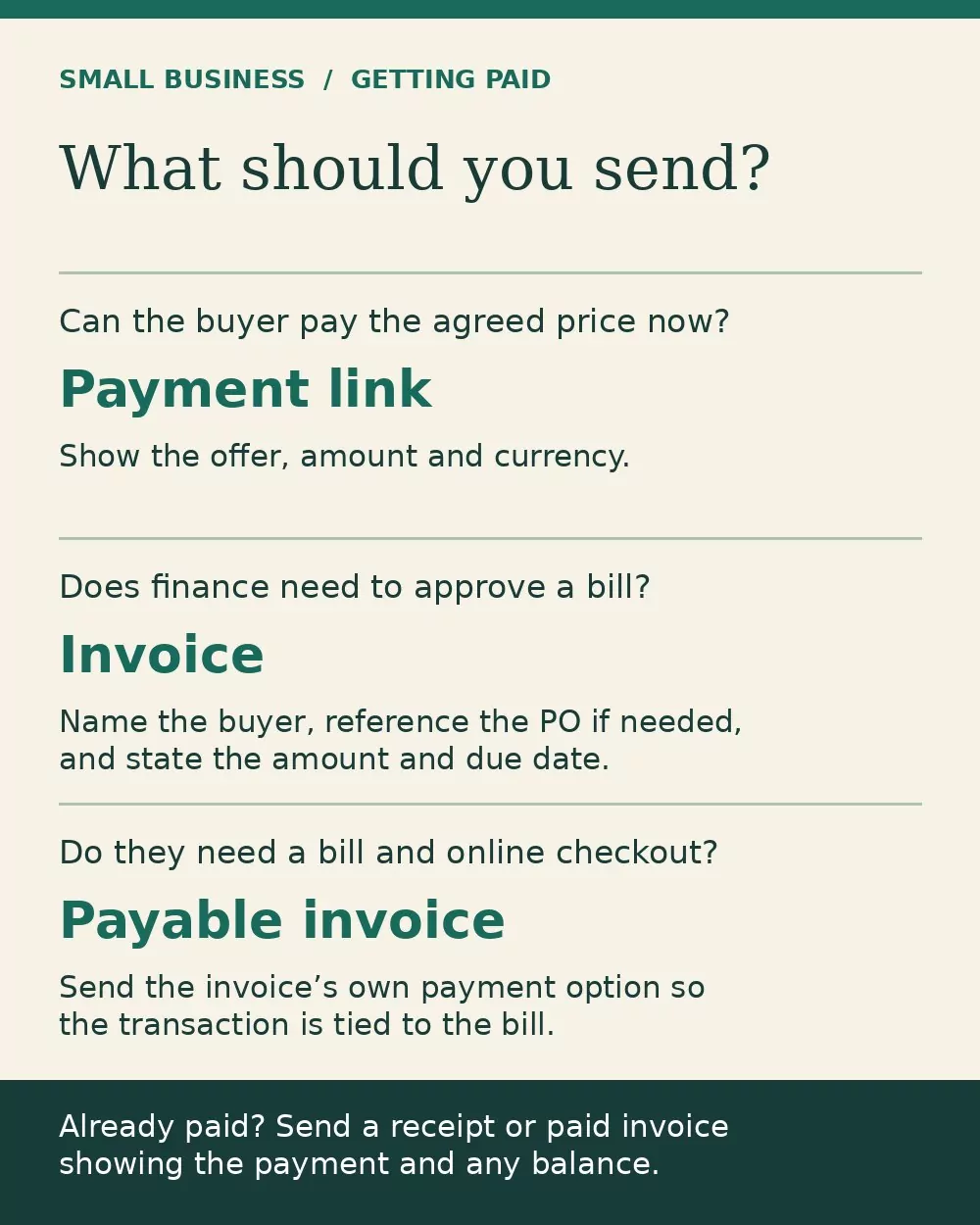
The payment link vs invoice decision comes down to what your customer needs before they can pay. Send a payment link when the price is agreed and the customer can check out now. Send an invoice when they need an itemized bill, a due date, a purchase order reference, or a record to submit to accounts payable. If they need the bill and want to pay online, send an invoice with its own payment option.
A link is often enough for a $60 workshop seat. A company buying ten seats might ask for a bill in its legal name, even if it pays the same day. What changes is the buyer’s approval process. You can keep checkout easy in either case.
Payment link vs invoice at a glance
A payment link opens a hosted checkout page. Depending on how you configure it, the same link might sell a standard service to many customers, or you might create a link for one order. An invoice records a specific amount billed to a named customer. It normally identifies the goods or services, sets out the payment terms, and gives both sides a reference for following up.
An invoice can arrive as a PDF, a hosted web page, or both. A URL in a message could therefore lead to a checkout page for an offer or to an invoice for a specific customer. PayPal, for example, documents both standalone checkout links and hosted invoice links. Before copying the URL, open the customer view and check which record it shows.
| What the customer needs | What to send | What to check before sending |
|---|---|---|
| Pay now for a clearly priced product, seat, or standard service | Payment link | Confirm the offer, total, currency, and whether the link can be used again. |
| Route a bill through accounts payable | Invoice | Ask for the correct billing entity, recipient, and PO number if required. |
| Keep a bill on file and pay it online | Invoice with its own payment option | Confirm that payment will be applied to that invoice. |
| Pay a deposit now and the rest later | Invoice with a deposit schedule or separate invoices for each agreed stage | Show what is due now, when the balance is due, and how the first payment is applied. |
| Get approval for work you haven’t agreed to start | Quote or estimate first | Confirm what approval means and when the first amount becomes payable. |
| Get proof of a payment already made | Receipt or paid invoice, as appropriate | Confirm the transaction, amount, and remaining balance, if any. |
Send a payment link when the buyer is ready to check out
A standalone payment link works well when the offer is easy to describe and the price is settled. Common examples include a ticket, a fixed-price consultation, an add-on, or a standard service sold through email or a message. The customer opens the link, reviews the details, and pays using a method available in that checkout.
The message should give the buyer enough information to recognize the charge. Include what they’re buying, the amount and currency, and what happens after payment. For a consultation, tell them whether the payment confirms a time you’ve already agreed or whether you’ll send booking instructions afterward. If the checkout calculates tax or adds shipping, make sure the customer can see the final total before paying.
Decide whether the link is for an offer or for a particular order. A reusable workshop link can make sense while seats are available. A custom deposit for a named client calls for a reference that lets you identify the job. If your provider supports limiting uses or deactivating a link, check those settings before sharing it. A link copied into an old message can still reach the buyer after an offer closes.
A short message for a fixed-price service might read like this.
Hi Jordan, here’s the payment link for the 45-minute website review we discussed. The total is $120 USD. Once the payment is confirmed, I’ll send the scheduling options.
Use your provider’s payment status to confirm the order. Even when two customers pay the same amount at nearly the same time, their transaction IDs are different. Capture a booking or order reference where the tool supports it, especially if one person may book and another may pay.
Send an invoice when someone has to approve the bill
A business buyer may have a straightforward purchase and still need a formal invoice. Their finance team may have to check the supplier name, match the bill to a purchase order, allocate the cost to a department, or wait for the next payment run. A checkout link by itself may leave that team asking for paperwork it needs before it can release payment.
Before you send the first invoice to a company, ask who processes it and what their system needs. The project manager’s contact details may differ from the accounts payable address. Confirm the legal billing name, any required PO number, the agreed currency and payment terms, and whether the buyer wants the invoice emailed or submitted through a supplier portal.
When you write the invoice, describe the work so somebody outside the project can recognize it. “October reporting and dashboard maintenance, per PO 4831” gives an approver more to work with than “Consulting.” For a monthly retainer, include the service period. For a project with installments, state which stage the current bill covers. Use a calendar due date if there’s room for misunderstanding about when the term starts.
Hi Jordan, I’ve attached invoice INV-1042 for the October reporting work under PO 4831. The total is $1,200 USD, due December 15. The invoice includes a payment option and the agreed bank transfer instructions.
Where a tax invoice is required, check the rules that apply to the sale and make sure the document you issue meets them. In the UK, for example, HMRC’s VAT invoice guidance specifies what a full VAT invoice must contain, including a unique sequential number and details of the supply. A checkout confirmation should only be treated as the required invoice if the document it produces meets the applicable requirements.
When you need both, give the customer one bill to pay
An invoice with a built-in payment option usually gives both teams the clearest record. The buyer can forward the bill for approval and later open the same invoice to pay, if the system supports that workflow. Your team can check the invoice status and see which transaction paid it. Stripe documents hosted payment pages for invoices. Square Invoices documents deposit and milestone schedules, with multiple milestones available on eligible plans.
If you send a PDF from one tool and a separate checkout link from another, decide how you’ll tie the payments together before the customer sees either. Put the invoice number on the payment request where the checkout supports a reference. Check the amount and currency, and identify who will record the payment in your billing system. If the buyer pays by bank transfer, update the invoice and handle the separate link so it can’t accidentally invite a second payment for the same balance.
A deposit should tell the client what remains due
Consider a $900 project with $300 due at booking and $600 due at delivery. If the invoice tool supports that schedule, send the invoice with the two amounts and their agreed due points. If you issue a separate deposit invoice, give the client the project reference and make clear how the $300 will be applied. When it’s time to request the final payment, show the $600 still due and acknowledge the deposit already received.
The same approach applies if you use a link for the first payment. Make sure the checkout says it’s for the $300 project deposit, and record the transaction against the project when it goes through. Otherwise, someone preparing the final bill could see a $900 contract and miss the deposit sitting in a separate dashboard.
Make sure you can match the money to the sale
An invoice, a receipt, and a payout report answer different questions. An invoice tells you what you billed. A receipt or payment record tells you what the customer paid. A payout report helps explain what the processor sent to your bank. A deposit in your bank account may cover multiple sales and can differ from the total paid by customers because of fees, refunds, or other adjustments.
For example, suppose a customer pays a $300 deposit and the processor deducts a $9 fee before transferring $291. The customer paid $300 toward the project. The payout report accounts for how $291 reached the bank. If you use the bank deposit alone to update the customer’s balance, you could ask them for another $9 they don’t owe. Give the person reconciling payments the original invoice or order reference, the transaction ID, and the payout details.
In the US, the IRS small-business recordkeeping guide lists invoices, receipts, and deposit slips among the supporting documents businesses may use to substantiate entries in their books. Keep the records that let you trace a sale through payment and settlement, including any refund or adjustment that changes the amount.
If you’re comparing providers, check how each one handles invoice references, payment confirmations, refunds, and exports for your account. For clients who pay across borders, also check the currency shown to the buyer and how the money settles to you. For domestic service invoices, compare ACH and card payments using the fees and settlement terms on your own account.
The question to ask before you press send
If the payment link vs invoice choice is unclear, ask, “Can you pay from a checkout link, or does your finance team need an invoice first?” If they’re ready to buy and you can match the payment to the order, send the link. If their team needs to approve or file a bill, send the invoice with the references it needs. Where both needs apply, one payable invoice gives the buyer a way to pay and gives your team a record to reconcile.